Home > HSRP Hotspot

HSRP Hotspot

April 8th, 2012 in Hotspot Go to comments

Question:

HSRP_Hotspot

- DSW1( Distribute switch 1) is the primary device for Vlan 101, 102, 105
– DSW2 ( Distribute switch 2) is the primary device for Vlan 103 and 104


Question 1:


During routine maintenance, it became necessary to shutdown G1/0/1 on DSW1. All other interface were up. During this time, DSW1 remained the active device for Vlan 102′s HSRP group. You have determined that there is an issue with the decrement value in the track command in Vlan 102′s HSRP group. What need to be done to make the group function properly?

A. The DSW1′s decrement value should be configured with a value from 5 to 15
B. The DSW1′s decrement value should be configured with a value from 9 to 15
C. The DSW1′s decrement value should be configured with a value from 11 to 18
D. The DSW1′s decrement value should be configured with a value from 195 to less than 205
E. The DSW1′s decrement value should be configured with a value from 200 to less than 205
F. The DSW1′s decrement value should be greater than 190 and less 200


Answer: C

Explanation:

The question clearly stated that there was an issue with the decrement value in VLAN 102 so we should check VLAN 102 on both DSW1 and DSW2 switches first. Click on the PC Console1 and PC Console2 to access these switches then use the “show running-config” command on both switches

DSW1>enable
DSW1#show running-config

DSW2>enable
DSW2#show running-config
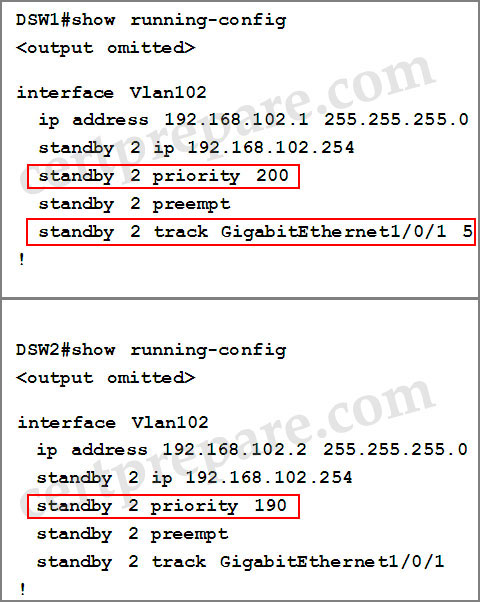
HSRP_show_run

As shown in the outputs, the DSW1′s priority is 200 and is higher than that of DSW2 so DSW1 becomes active switch for the group. Notice that the interface Gig1/0/1 on DSW1 is being tracked so when this interface goes down, HSRP automatically reduces the router’s priority by a configurable amount, in this case 5. Therefore the priority of DSW1 goes down from 200 to 195. But this value is still higher than that of DSW2 (190) so DSW1 remains the active switch for the group. To make DSW2 takes over this role, we have to configure DSW1′s decrement value with a value equal or greater than 11 so that its result is smaller than that of DSW2 (200 – 11 < 190). Therefore C is the correct answer.

Question 2:

During routine maintenance, G1/0/1 on DSW1 was shutdown. All other interface were up. DSW2 became the active HSRP device for Vlan101 as desired. However, after G1/0/1 on DSW1 was reactivated. DSW1 did not become the active HSRP device as desired. What need to be done to make the group for Vlan101 function properly?

A. Enable preempt on DSW1′s Vlan101 HSRP group
B. Disable preempt on DSW1′s Vlan101 HSRP group
C. Decrease DSW1′s priority value for Vlan101 HSRP group to a value that is less than priority value configured on DSW2′s HSRP group for Vlan101
D. Decrease the decrement in the track command for DSW1′s Vlan 101 HSRP group to a value less than the value in the track command for DSW2′s Vlan 101 HSRP group.


Answer: A

Explanation:

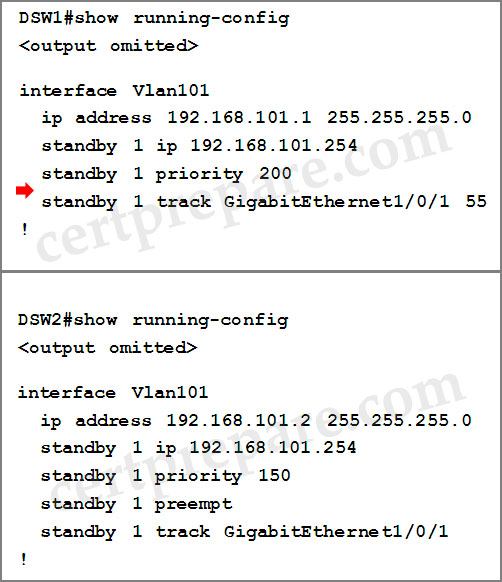
Continue to check VLAN 101 on both switches…
HSRP_show_run_2.jpg

We learned that DSW1 doesn’t have the “standby 1 preempt” command so it can’t take over the active role again even if its priority is the highest. So we need to enable this command on VLAN 101 of DSW1.

Question 3:

DSW2 has not become the active device for Vlan103′s HSRP group even though all interfaces are active. As related to Vlan103′s HSRP group. What can be done to make the group function properly?

A. On DSW1, disable preempt
B. On DSW1, decrease the priority value to a value less than 190 and greater than 150
C. On DSW2, increase the priority value to a value greater 241 and less than 249
D. On DSW2, increase the decrement value in the track command to a value greater than 10 and less than 50.


Answer: B or C

Explanation:

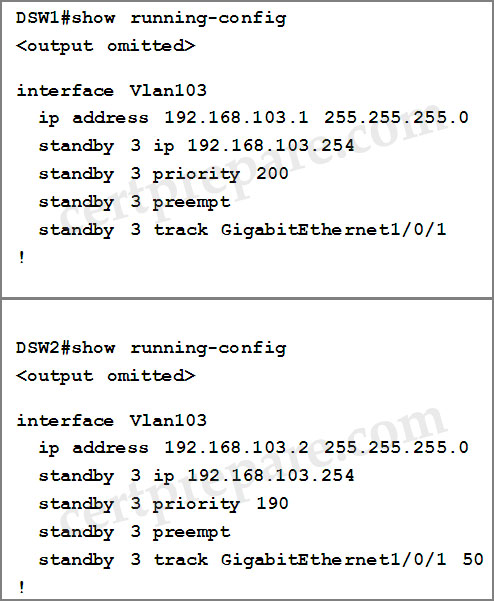
HSRP_vlan103

The reason DSW2 has not become the active switch for Vlan103 is because the priority value of DSW1 is higher than that of DSW2. In order to make DSW2 become the active switch, we need to increase DSW2′s priority (to higher than 200) or decrease DSW1′s priority (to lower than 190).

Question 4:

If G1/0/1 on DSW1 is shutdown, what will be the current priority value of the Vlan105′s group on DSW1?

A. 95
B. 100
C. 150
D. 200


Answer: A

Explanation:

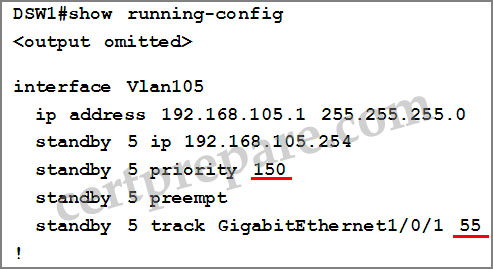
Below is the output of VLAN 105:

HSRP_vlan105.jpg

If G1/0/1 on DSW1 is shutdown, its priority will decrease 55 so, its value will be 150 – 55 = 95

Question 5:

What is the configured priority value of the Vlan105′s group on DSW2 ?

A. 50
B. 100
C. 150
D. 200


Answer: B

Explanation:

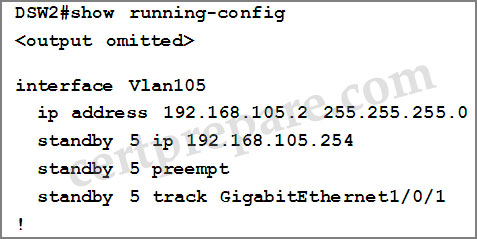
Below is the output of VLAN 105 of DSW2:
HSRP_vlan105_DSW2.jpg

We don’t see the priority of DSW2 so it is using the default value (100).

Question 6:

During routine maintenance, it became necessary to shutdown G1/0/1 on DSW1 and DSW2. All other interface were up. During this time, DSW1 became the active device for Vlan104′s HSRP group. As related to Vlan104′s HSRP group, what can be done to make the group function properly?

A. On DSW1, disable preempt
B. On DSW2, decrease the priority value to a value less than 150
C. On DSW1, increase the decrement value in the track command to a value greater than 6
D. On DSW1, disable track command.


Answer: C

Explanation:

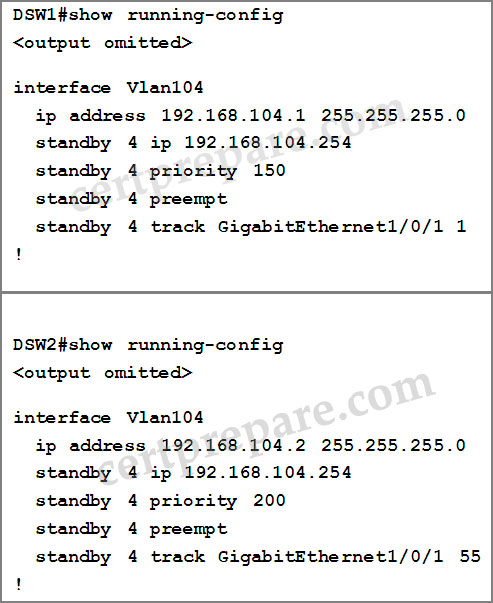
HSRP_vlan104

The question asks us how to keep the active role of DSW2. From the outputs, we learned that if both interfaces G1/0/1 of DSW1 and DSW2 are shutdown, the priority of DSW1 will be 150 – 1 = 149 and that of DSW2 will be 200 – 55 = 145 -> DSW1 will become the active switch.

The main point here is that we have to configure so in such a way that when both interfaces G1/0/1 of DSW1 and DSW2 are shutdown, the priority of DSW2 is still greater than that of DSW1. Therefore the priority value of DSW1 should be smaller than 145, or we have to configure the decrement value of DSW1 to a value greater than 6 ( 6 = 150 – 144) -> C is the correct answer.

Notice: To keep the active role of DSW2, we can disable “preempt” on DSW1 (answer A) so that it will not take over the active role when DSW1 is downed but it also means that VLAN 104 will not have active switch -> VLAN104 will fail.

Comments
Comment pages
1 2 3 30
  1. Dinesh Kumar
    April 24th, 2013

    Q3, why answer A was not correct. if we disabled preempt in DSW1 then DSW2 will became active. Since preempt cmd was enabled in DSW2. so DSW2 will act as Active for vlan 103 eventhough Priority of DSW1 was higher then DSW2. Preempt is nothing but give first preference. please correct me if i am wrong.

  2. Dinesh Kumar
    April 24th, 2013

    Q6. No where it was mentioned to Keep DSW2 was active switch. But answer was related to make the DSW2 switch as active. this topic more confusing for me. Please clear my all doubts..(including all questions asked above)

  3. anonymous
    May 3rd, 2013

    The Correct answer on Q3 is B
    This is why: The default decrement value is 10. When interface GigabitEthernet1/0/1 is down on DWS1 the priority is lowered to 190. Now the the priority of both switches are equal, now the switches have to break the tie this is done by the lowest IP address assigned to the interface,because DSW1 has a lower IP address then DSW2. DSW1 wins the election.

    If You raise the Priority on DSW2 to 241. In a case of a link failure GigabitEthernet1/0/1 the prioity outcome will be 241-50=191. So what matter happens DSW2 stays active al time.

  4. no nam
    May 4th, 2013

    @anonymous

    You are partially correct. You have the right idea, that B is right.

    One correction – HSRP election process goes by highest priority. If priorities are equal then HIGHEST (not lowest) IP address wins.

  5. shruthi @ ban
    May 4th, 2013

    in q no 1 wy ans is not b

  6. no nam
    May 5th, 2013

    @shruthi

    If the priority decrements 9, then the priority will be 191 (200 – 9 = 191). Since 191 is higher than DSW2 priority of 190, DSW1 will remain active router and problem will still exist.

  7. shruthi @ ban
    May 6th, 2013

    no nam …thank you yes it is

  8. Azrael
    May 7th, 2013

    In Q3 no is B, is C, because you have these priorities:
    DSW1: 200-10=190*
    DSW2:190-50=140
    If you choose answer B and select a value of 151 for DSW1 (that priority is more than 150 and less than 190)
    DSW1:151-10=141*
    DSW2:190-50=140

    In both cases DSW1 will be active HRSP device

    If you apply answer C:

    DSW1: 200-10=190
    DSW2: 242-50=192*

    Answer C is right

  9. Jesus
    May 7th, 2013

    @Azrael you are right

  10. domi
    May 8th, 2013

    No, you are not right:
    When you choose 151 for DSW1, DSW2 will be active (higher priority 190).
    When fail occurs DSW1 -> 141, DSW2 -> 140 (DSW1 active).

    On the other hand, option C:
    241 for DSW2 vs 200 for DSW1 (DSW2 active).
    When fail occurs DSW2 -> 191, DSW1 -> 190 (DSW2 active),
    So be B is correct, and C is wrong because DSW2 will always be active.

  11. Azrael
    May 8th, 2013

    @domi
    Please, read again question 3, carefull, in that question you are asked about what do you do for become ACTIVE DSW2, no DSW1, that you are asked in other questions about DSW1 is not that in Q3 you like to became active DSW1.
    C is right.

  12. domi
    May 8th, 2013

    @Azrael,
    Yup, but in my scenario you make DSW2 active in both cases (if both links are up), however if you think about it what is the sense to make DSW2 always active in HSRP? You should allow proper failover so that group will behave correctly.

    However,

    @Certprepare
    In real exam (I wrote today), there are some other question, f.e. :

    A) If G1/0/1 on DSW1 is shutdown, what will be the current priority value of the VlanXXX′s group on DSW1?

    When there was no priority set and no track decrement (correct answer 100-10 = 90).

    B) In Q3 there are no answer
    C. On DSW2, increase the priority value to a value greater 241 and less than 249
    but
    C. On DSW2, increase the priority value to a value greater then 200 and less than 249

    Also in scenario there are sentence:
    DSW1 is primary for vlans : List of vlans
    DSW2 is primary for other vlans : List of these vlans

    If G1/0/1 is up this rule should be valid. If G1/0/1 on primary device has failed it should failover to other device, if on this other device G1/0/1 has also failed it should not.

    Please site admin add this comments above to help other students :)

  13. JustPassed
    May 8th, 2013

    This was in the Exam today.

  14. Jesus
    May 9th, 2013

    Hello body I pass 967/1000 today all question for boomish

    Cisco.ActualTests.642-813.v2012-10-29.by.boomish.154q.vce

    a) just this Q

    DSW2 has not become the active device for Vlan103′s HSRP group even though all interfaces are active. As related to Vlan103′s HSRP group. What can be done to make the group function properly?

    B. On DSW1, decrease the priority value to a value less than 190 and greater than 150
    IN THE EXAM CHANGE
    C. On DSW2, increase the priority value to a value greater 241 and less than 249

    AS FOLLOW
    C. On DSW2, increase the priority value to a value greater 200 and less than 250

    I selected opcion B but i think that a had an error and is opcion C

    good luck!!!

  15. james
    May 12th, 2013

    Hi i have successfully completed 642-813 exam i prepared exam using 642-813 – v12.2 / 155 GB contact foxboxall@gmail.cm to get this dump

  16. Premium Member Quiz Errors
    May 12th, 2013

    FYI, there are 2 errors on the premium quiz.

    Question 2 has the wrong answer.

    Question 3 also has the wrong answer.

  17. Kamal
    May 13th, 2013

    Why Q1 answer F is incorrect. Answer F can lead to priority from 9 to 1. Please answer.

  18. unnamed_id
    May 15th, 2013

    Q3: I answered C & got 1000/1000

Comment pages
1 2 3 30
  1. No trackbacks yet.
Add a Comment