
LACP with STP Sim
Question
You work for SWITCH.com. They have just added a new switch (SwitchB) to the existing network as shown in the topology diagram.
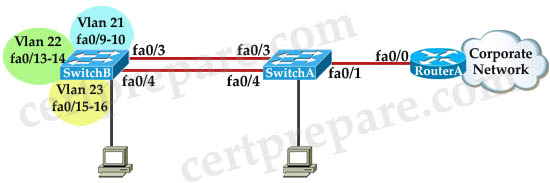
RouterA is currently configured correctly and is providing the routing function for devices on SwitchA and SwitchB. SwitchA is currently configured correctly, but will need to be modified to support the addition of SwitchB. SwitchB has a minimal configuration. You have been tasked with competing the needed configuring of SwitchA and SwitchB. SwitchA and SwitchB use Cisco as the enable password.
Configuration Requirements for SwitchA
- The VTP and STP configuration modes on SwitchA should not be modified.
– SwitchA needs to be the root switch for vlans 11, 12, 13, 21, 22 and 23. All other vlans should be left are their default values.
Configuration Requirements for SwitchB
- Vlan 21, Name: Marketing, will support two servers attached to fa0/9 and fa0/10
– Vlan 22, Name: Sales, will support two servers attached to fa0/13 and fa0/14
– Vlan 23, Name: Engineering, will support two servers attached to fa0/15 and fa0/16
– Access ports that connect to server should transition immediately to forwarding state upon detecting the connection of a device.
– SwitchB VTP mode needs to be the same as SwitchA.
– SwitchB must operate in the same spanning tree mode as SwitchA.
– No routing is to be configured on SwitchB.
– Only the SVI vlan 1 is to be configured and it is to use address 192.168.1.11/24.
Inter-switch Connectivity Configuration Requirements:
- For operational and security reasons trunking should be unconditional and Vlans 1, 21, 22 and 23 should tagged when traversing the trunk link.
– The two trunks between SwitchA and SwitchB need to be configured in a mode that allows for the maximum use of their bandwidth for all vlans. This mode should be done with a non-proprietary protocol, with SwitchA controlling activation.
– Propagation of unnecessary broadcasts should be limited using manual pruning on this trunk link.
Answer and Explanation:
Below is a good solution commented by Ruci. Please say thank to Ruci!
SW-A (close to router)
SW-A#configure terminal
SW-A(config)#spanning-tree vlan 11-13,21-23 root primary
SW-A(config)#vlan 21
SW-A(config-vlan)#name Marketing
SW-A(config-vlan)#exit
SW-A(config)#vlan 22
SW-A(config-vlan)#name Sales
SW-A(config-vlan)#exit
SW-A(config)#vlan 23
SW-A(config-vlan)#name Engineering
SW-A(config-vlan)#exit
SW-A(config)#interface range Fa0/3 – 4
SW-A(config-if-range)#no switchport mode access
SW-A(config-if-range)#no switchport access vlan 98 (These two commands must be deleted to form a trunking link)
SW-A(config-if-range)#switchport trunk encapsulation dot1q (cannot issued this command on this switch, but don’t worry coz I still got 100%)
SW-A(config-if-range)#switchport mode trunk
SW-A(config-if-range)#switchport trunk native vlan 99
SW-A(config-if-range)#switchport trunk allowed vlan 1,21-23
SW-A(config-if-range)#channel-group 1 mode active
SW-A(config-if-range)#channel-protocol lacp
SW-A(config-if-range)#no shutdown
SW-A(config-if-range)#end
——————————————————————————————–
SW-B (far from router)
SW-B#configure terminal
SW-B(config)#vlan 21
SW-B(config-vlan)#name Marketing
SW-B(config-vlan)#exit
SW-B(config)#vlan 22
SW-B(config-vlan)#name Sales
SW-B(config-vlan)#exit
SW-B(config)#vlan 23
SW-B(config-vlan)#name Engineering
SW-B(config-vlan)#exit
SW-B(config)#vlan 99
SW-B(config-vlan)#name TrunkNative // not necessary to name it but just name it same as SwitchA
SW-B(config-vlan)#exit
SW-B(config)#interface range Fa0/9 – 10
SW-B(config-if-range)#switchport mode access
SW-B(config-if-range)#switchport access vlan 21
SW-B(config-if-range)#spanning-tree portfast
SW-B(config-if-range)#no shutdown
SW-B(config-if-range)#exit
SW-B(config)#interface range Fa0/13 – 14
SW-B(config-if-range)#switchport mode access
SW-B(config-if-range)#switchport access vlan 22
SW-B(config-if-range)#spanning-tree portfast
SW-B(config-if-range)#no shutdown
SW-B(config-if-range)#exit
SW-B(config)#interface range Fa0/15 – 16
SW-B(config-if-range)#switchport mode access
SW-B(config-if-range)#switchport access vlan 23
SW-B(config-if-range)#spanning-tree portfast
SW-B(config-if-range)#no shutdown
SW-B(config-if-range)#exit
SW-B(config)#vtp mode transparent
SW-B(config)#spanning-tree mode rapid-pvst
SW-B(config)#ip default-gateway 192.168.1.1 (you can get this IP from SW-A with command show cdp neighbour detail) // not sure about this command because the question says “No routing is to be configured on SwitchB”.
SW-B(config)#interface vlan 1
SW-B(config-if)#ip address 192.168.1.11 255.255.255.0
SW-B(config-if)#no shutdown
SW-B(config-if)#exit
SW-B(config)#interface range Fa0/3 – 4
SW-B(config-if-range)#switchport trunk encapsulation dot1q (yes I can issued this command on this switch)
SW-B(config-if-range)#switchport mode trunk
SW-B(config-if-range)#switchport trunk native vlan 99
SW-B(config-if-range)#switchport trunk allowed vlan 1,21-23
SW-B(config-if-range)#channel-group 1 mode passive //mode passive because “SwitchA controlling activation”
SW-B(config-if-range)#channel-protocol lacp
SW-B(config-if-range)#no shutdown
SW-B(config-if-range)#end
———————————————————
Some guidelines for configuring SwitchA & SwitchB:
Configuration Requirements for SwitchA
| - The VTP and STP configuration modes on SwitchA should not be modified. – SwitchA needs to be the root switch for vlans 11, 12, 13, 21, 22 and 23. All other vlans should be left are their default values |
SW-A(config)#spanning-tree vlan 11-13,21-23 root primary |
Configuration Requirements for SwitchB
| - Vlan 21, Name: Marketing, will support two servers attached to fa0/9 and fa0/10 – Vlan 22, Name: Sales, will support two servers attached to fa0/13 and fa0/14 – Vlan 23, Name: Engineering, will support two servers attached to fa0/15 and fa0/16 – Access ports that connect to server should transition immediately to forwarding state upon detecting the connection of a device. |
vlan … name … (VLANs must be created on both switches if not exist) interface range Fa0/x – x switchport mode access switchport access vlan spanning-tree portfast |
| - SwitchB VTP mode needs to be the same as SwitchA. | vtp mode transparent |
| - SwitchB must operate in the same spanning tree mode as SwitchA. | spanning-tree mode rapid-pvst |
| - No routing is to be configured on SwitchB. – Only the SVI vlan 1 is to be configured and it is to use address 192.168.1.11/24. |
interface vlan 1 ip address 192.168.1.11 255.255.255.0 |
Inter-switch Connectivity Configuration Requirements:
| - For operational and security reasons trunking should be unconditional and Vlans 1, 21, 22 and 23 should tagged when traversing the trunk link. | SW-A(config)#interface range Fa0/3 – 4 SW-A(config-if)#no switchport mode access SW-A(config-if)#no switchport access vlan 98 //These two commands must be deleted to form a trunking link. SW-A(config-if)#switchport mode trunk SW-A(config-if)#switchport trunk native vlan 99 ————————————— SW-B(config)#interface range Fa0/3 – 4 SW-B(config-if)#switchport trunk encapsulation dot1q (yes I can issued this command on this switch) SW-B(config-if)#switchport mode trunk SW-B(config-if)#switchport trunk native vlan 99 |
| - The two trunks between SwitchA and SwitchB need to be configured in a mode that allows for the maximum use of their bandwidth for all vlans. This mode should be done with a non-proprietary protocol, with SwitchA controlling activation. | SW-A(config)#interface range Fa0/3 – 4 SW-A(config-if)#channel-group 1 mode active SW-A(config-if)#channel-protocol lacp SW-A(config-if)#no shutdown ————————————— SW-B(config)#interface range Fa0/3 – 4 SW-B(config-if)#channel-group 1 mode passive SW-B(config-if)#channel-protocol lacp SW-B(config-if)#no shutdown ————————————— Maybe the interface Port-channel 1 was configured on both switches so we don’t configure it here. If not we have to configure them with “interface port-channel 1″ command. Also you have to turn them up. |
| - Propagation of unnecessary broadcasts should be limited using manual pruning on this trunk link. | SW-A(config)#interface range Fa0/3 – 4 SW-A(config-if)#switchport trunk allowed vlan 1,21-23 ————————————— SW-B(config)#interface range Fa0/3 – 4 SW-B(config-if)#switchport trunk allowed vlan 1,21-23 |
You may have to configure Interface Port-Channel on both switches. Check the configuration first, if it does not exist, use these commands:
Interface port-channel1
switchport mode trunk
switchport trunk native vlan 99 //this command will prevent the “Native VLAN mismatched” error on both switches
switchport trunk allowed vlan 1,21-23,99
Some notes for this sim:
+ You should check the initial status of both switches with these commands: show vtp status (transparent mode on switchA and we have to set the same mode on switchB), show spanning-tree [summary] (rapid-pvst mode on switchA and we have to set the same mode on switchB), show vlan (check the native vlan and the existence of vlan99), show etherchannel 1 port-channel and show ip int brief(check if Port-channel 1 has been created and make sure it is up), show run (to check everything again).
+ When using “int range f0/x – y” command hit space bar before and after “-” otherwise the simulator does not accept it.
+ You must create vlan 99 for the switchB. SwitchA already have vlan 99 configured.
+ At the end, you can try to ping from SwitchB to RouterA (you can get the IP on RouterA via the show cdp neighbors detail on SwitchA), not sure if it can ping or not. If not, you can use the “ip default-gateway 192.168.1.1″ on SwitchB.
+ The name of SwitchA and SwitchB can be swapped or changed so be careful to put your configuration into appropriate switch.
We hope with this information our candidates can find the best solution in the exam. If you learn anything new about this sim please share with us!
Other lab-sims in this site:
MLS and EIGRP Sim
VTP Lab 2
VTP Lab
Spanning Tree Lab Sim
AAAdot1x Lab Sim

i want to ask a simple question from where did u get vlan 99 i really don’t understand this point there is no vlan 99 in the question ????
in real examen i has no any command same as Copy running-config or write.
2 Ilam El Gohary:
about vlan 98 99. Config file of SwitchA has vlan 98 and 99. Vlan 99 has name – “TrunkNative”, Vlan 98 – (don`t remember exactly) “access vlan” or like.
Also I checked configs on interfaces with commant “sh inter switch Fa0/3″, there saw that trunk native – vl 99, access vlan – 98.
So, i decide to config SwithB as the same :
switchport trunk native vlan 99
switchport access vlan 98
Another words, this vlan described in SwitchA config file.
2 Master:
Not at all, in lab “MLS and EIGRP Sim” command “cop run sta” works correctly. In this current lab commands “write” and “copy run start” doesn`t work. Man in test center said me write this moment in comments. Result – passed with 956 points )))
I get the feeling that “…with SwitchA controlling activation.” is referring to the setting of the LACP system priority using the
lacp system–priority ‘priority’
command in global config mode. This makes SwitchA the switch that’s in control of choosing what ports are active on the etherchannel
This is great… I have done it, very easy.. thanks
Ilam El Gohary:
don’t worry about the vlan 99 : because it just a random unused vlan to make it as a native vlan for a security reason as the say in the lab “Vlans 1, 21, 22 and 23 should tagged”
so we need to make any unused vlan as a native vlan because a native vlan is untagged vlan.
Do we add :
switchport trunk native vlan 99
switchport trunk allow vlan 1,21-23
channel-group 1
channel-protocol lacp
Under
fa0/3 -4
and
interface port channel 1
Both ??
Please can anybody help me with the link or any site to get the most latest 642-813 (switching) dumps.. Am done reading, just want 2 skim through the dumps b4 going for the exam…tnx
i need image files of Switches for GNS3 lab preparation. can any one help on it and also if provide images other than routers also helpful for me(virtual host,firewall and so on). Please mail me the images to dineshkumar.b.e.e.e@gmail.com
I have a question regarding to the vlan allowed.
Do we have the use the below command?
switchport trunk allow vlan none
Thanks
@Quick: I second your question:
Do we add :
switchport trunk native vlan 99
switchport trunk allow vlan 1,21-23
channel-group 1
channel-protocol lacp
Under
fa0/3 -4
and
interface port channel 1
Both ??
@Quick & @ Frolic
No you don’t the following commands are used to create the port channel, so there would be no use adding the commands under the port channel 1
channel-group 1
channel-protocol lacp
The following commands are inherited but either or, so if you add this under fa0/3-4 or portchannel 1 it will be inherited by the other.
switchport trunk allow vlan 1,21-23
I was under the impression that the native vlan would work the same but it appears that you need to past that command under both
Thx Ruci. I am gona take this 23/04. Wish me luck!
@Mr.Winter
Ya, I do realize that. I actually just wanted to know if we need to define the native vlan on int range fa0/3-4 and Po1 both. While I was practicing this lab, the switch complained of native vlan mismatch even when vlan 99 was configured on both the switches for fa0/3-4. It was only after I configured them on the Po1 when the mismatch msgs stopped.
Thank you for your response. 16 hours before the exam. Fingers crossed. God Bless.
God Bless! Frolic…
I’m taking my exam this week.. i’m drilling myself with this LACP/STP sim.
I’m using the packet TRACERS’ from Ruci ‘ See Above’ do download, for N00bs.
Would really appreciate you posting any tips here for about your SIM, or
PLEASE email me directly @ ccna_ccnp_1000@rocketmail.com
I MUST Pass this test….
Thanks Frolic! GOOD LUCK on test….
and RELAX :-)
Finally resolved the Navtive VLAN Mismatch
((%%CDP-4-NATIVE_VLAN_MISMATCH: Native VLAN mismatch discovered on FastEthernet0/4 (1),
entering the following commands:
SwitchB#config t
SwitchB(config)#interface port-channel 1
SwitchB(Config-if)#switchport mode trunk
SwitchB(Config-if)#switchport trunk native vlan 99
Test Next Week…Drop me some Nuggets?
Thanks to the Cisco Community!!!
@ fgb you can download the latest dumps on examcollection.com, then select the exam that you want. It helped me with my route exam. Im taking the exam in two weeks, this is really helpful.
@Frolic How did the exam go?
Yes Frolic…? Waiting on you buddy
Question for an ACE that has passed the exam..or anyone?
With changing the NATIVE VLAN….manually config VLAN 1 into VLAN 99?
Do we REALLY need to create a VLAN 99 on Switch B, because it’s NOT already on SWA???
SW-B(config)#vlan 99
SW-B(config-vlan)#name TrunkNative // not necessary to name it but just name it same as SwitchA
???
IS this really needed to pass the exam?
Thank you Much!
-Vaji
Also,
SW-B(config-if-range)#switchport trunk native vlan 99
SW-B(config-if-range)#switchport trunk allowed vlan 1,21-23, 99<——–|
Since we trunking between swtiches over a Port Channel, and since we manually change VLAN 1 to VLAN 99 (((Native))).
DO we need to added the vlan 99, onto that trunk/port-channel on BOTH SWA and SWB to pass the exam!?
SW-B(config-if-range)#switchport trunk allowed vlan 1,21-23, 99
I would say yes…but I don't want to get it wronfg….
THANK YOU EXPERTS!
Native vlan will NOT be tagged on a trunk
Thank YOU! @Vlan-man, so on the EXAM…you won’t need to do this…SW-B(config-if-range)#switchport trunk allowed vlan 1,21-23, 99<——–|
and should be simply:
SW-B(config-if-range)#switchport trunk allowed vlan 1,21-23,
If you. Are going to allow native vlan I would put it in the etherchannel interface like this
Switchport trunk native vlan 99
@Vaji:
Thanks, I passed. :)
Well, I was referring to Ruci’s sim as well. However, the SIM available on this website for packet tracer is not the same as above. It is slightly different. I just understood the concept from the sim above.. Practiced commands on real 3550s.
Also, on the exam, you will be asked to create vlan 99 as the native vlan. hence you should create it on both the switches. On one of the switches you’ll find an access vlan 98 already there. You will have to negate both the commands.
I scored 945 and I’m quite sure I may have lost points in this lab coz during verification, when I used : show int trunk , I didn’t see fa0/3 and 4 listed there. I did check the running config.. couldn’t figure out why would it not show..
Anyways.. Good luck with yours. You’ll crack it. :)
Hello Dears ,
Does this questions comes in the real exam as is , or with modifications ?
Please to feedback ,..
Trunk Ports will not be shown in the OUTPUT…fyi, so (don’t panic). Sh vlan (e.g..)
I have made the correct LACP with stp lab using packet tracer if anyone interest drop me a mail and i will send labs…..Ty <3 prashasthirox@gmail.com
just passed yesterday with score of 1000
100% valid for boomish
labs are:
1. eigrp hotspot
2. aaa dot1x
3. lacp switcha & switchb
4. eigrp & layer 3 config
[[[HSRP]]]]:
Redundancy protocols HSRP, VRRP, and GLBP
http://www.cisco.com/en/US/docs/switches/metro/me3400e/software/release/12.2_58_se/configuration/guide/swhsrp.pdf
http://cisconetworkingcenter.blogspot.com/2013/01/first-hop-redundancy-protocol.html
http://www.ciscopress.com/articles/article.asp?p=766858
This chapter provides information and commands concerning the following topics:
•Hot Standby Routing Protocol (HSRP)
—Configuring HSRP
—Verifying HSRP
—HSRP optimization options
—Debugging HSRP
•Virtual Router Redundancy Protocol (VRRP)
—Configuring VRRP
—Verifying VRRP
—Debugging VRRP
•Gateway Load Balancing Protocol (GLBP)
—Configuring GLBP
—Verifying GLBP
—Debugging GLBP
@Mo-I downloaded dumps for 642-813 from examcollection just like u advised but i couldnt view it bcoz if i try to view it using vce, it tells me that the file was created with older version of visual certexam than i have. And the file was downloaded with that version of visual certexam. What do i do please?
PlZ PLZ PLZ PLZ To ANSWER :
there is another format for the LACP with STP in the exam collection dump, which one came to you guys who passed the exam ??
Please advice
Do we add :
switchport trunk native vlan 99
switchport trunk allow vlan 1,21-23
channel-group 1
channel-protocol lacp
Under
fa0/3 -4
and
interface port channel 1
Both ??
No you just have to add the following commands in port channel 1, otherwise you will have a native vlan mismatch and all vlans will be allowed through the port channel
switchport trunk native vlan 99
switchport trunk allow vlan 1,21-23
Anonym posted:~
“Unfortunately the no version of the vlan access-map and vlan filter commands is not available. I got 0% just because I couldn’t remove the command I entered…
So, then…how do you remove/move them, undo what’s been done on the LACP/STP SIM?
What to do here….with the NO” not working on the EXAM? ?
Please expert help here, 4 those already passedD!
Many THANKZ
i have exam on 29th april.. here in the question they have not asked about the native vlan setting.. why is it done on both the switches.. i don’t under stand…
can somebody give the link to download free packet tracer 5.3.3?
Non of the lab files I have downloaded are opening correctly, I have a error while opening saying “this is not a valid packet tracer file” any thoughts ?
Thanks.
Resolved, updated to version 5.3.3 and works a charm, thanks.
RE: dot1q
Not sure if this has been answered. The reason why dot1q command is not available is because the IOS image they are using is for 2950 series. Catalyst 2950 comes ONLY with dot1q encapsulation by default.
@Vaji
Best of luck, Let us know how it goes with your exam, Tks
hi, that native vlan 99 is quite wrong cos it causes mismatch on fa0/4.
does anyone has a solution on that
@vaji how did u say u resolved the mismatch?
Should we be configuring the individual ports (F0/3 & F0/4) in the channel-group as trunk ports AND the port-channel as a trunk?
In real world practice, the individual ports would take on the configuration of the port-channel, which in this case is a trunk with pruning and a specified native vlan.
Is the redundancy necessary with the Cisco simulator? If the configuration is done to just the port-channel, will the individual ports take that configuration?
I just want to make sure I don’t miss this lab on the actual Switch Exam.
Should I go ahead and configure the individual ports (F0/3 & F0/4) AND the port-channel with the trunk specifications?
@Khan
Man.. Just do it how it is written. It’s a simulation, not a real equipment.
Just simply do it how it works. Otherwise you can test it during your exam and maybe then ask certprepare to update the labs ;).
P.S. I doubt you will find the answer to your question among these comments. Especially an answer that you could trust 100%.
@ Khan,
For Fa0/3-4 you may need to go with range and note that if you don’t assign these in to Channel-group and protocol “lacp” these two trunks will not load share as spannig tree will block one of the two ports, hope it answers your question
@chichi,
if you read the certprepare notes it says there how to resolve “mismatch”
“Interface port-channel1
switchport mode trunk
switchport trunk native vlan 99 //this command will prevent the “Native VLAN mismatched” error on both switches”
Where I can download the EIGRP hotspot lab simulation? I’m not seeing it on this page.
Dear All,
How to verify this lab work well ? Do we need test ping between Server ? Or just ping the gateway of Switch-B ?
Does anibody know where can I download the eigrp hotspot sim? – Thanks
Still the Boomish dumps and these simulations are valid ?
I heard that dumps are changed from 1st of may?
Is it true ? r it is still valid?
Can any one answer me
hello i did every thing correctly but it is not pinging from swb to router ????????????????/////
Hey ..in above config we also create VLANS on SW-A but those vlans not assigned to any ports? no ports mention in question also
but some of the dumps added same port for those Vlans which we used in SWB
Confused?
Whether we have to add any ports for SW-A Vlans or just create vlans & leave it as it is??
Please revert ASAP.
@Shruthi
YUP…SW-B Ping to Router ….make sure your interface vlan 1 shows UP in SW-b
If not do no shut
& you can able to Ping Router
& that do without setting ip default-gateway command…..
No need of that command
Just FYI if you have trouble establishing a connection thru port-channel 1 just go inside the physical int range fa 0/3-4 and do a shut and then no shut. Then go into the port-channel and do the same.
To verify do a show ether summary. You should see “SU” on both sides. If you see “SD” thats bad news.
Hi,
For this question, do you get any partial marks?
Hi,
Just to confirm, I see no point in configuring vlans on both switches, best thing would be to configure both as VTP servers and vlans would be the same and less prone to typo error?
Correct?
Why on port channel we pass vlan 99:
switchport trunk allowed vlan 1,21-23,99
when earlier we set this as native?
Shouldn’t on exam we put simply:
switchport trunk allowed vlan 1,21-23
???
This was on the Exam today
Tested and passed today and this was in there pretty much exactly the same. Host IPs were in the 172.16 range but the rest was the same. Even Vlan number and all
Good luck!
Why do we have to write ip default-gateway 192.168.1.1 ?
Hello,
I’ve passed today the exam with 1000.
I did this lab and I didn’t use the ip default gateway command, so it’s not necessary.
Thanks to certprepare for help me.
In LACP with STP Sim, although I configured completely according to Ruci, I still got “native vlan miss match error”,
and he said that we can use “switchport trunk encapsulation dot1q (yes I can issued this command on this switch) ” on switch B, but I cannot use this command and
I can just ping from switch B to server, cannot be able to ping from switch A to server.
is it true?
Do I need to be able to ping from switch A.
In Jojo lab, solution for lacp with STP is work but cannot be able to ping from switch A, but from switch B it is ok. But IP address for server is 10.10.10.1
IN Ghost lab, solution for lacp with STP is NOT work which mean both switch cannot ping to server. But IP address for server is 192.168.1.1
Waiting for yor reply. I am taking to exam soon ,so plz help me thanks u so much.
My email is lawkanat28@gmail.com.
I need to add some tips about this configuration and I recommend to use it for simplicity:
1- since we can configure the port channel interface and the commands will be applied inturn to the physical ports , we can add the trunk configurations on the port channel and it will be applied to all physical interfaces automatically.
2- I think its better to keep the physical interfaces shut till we finish configuration and then no shut them in the final step to avoid the huge logs on console during the configuration or we can use the command [no logging console] to avoid logs if available.
SW-A(config)#int range Fa0/3 – 4
SW-A(config-if-range)#channel-group 1 mode active
SW-A(config-if-range)#channel-protocol lacp
SW-A(config)#int port-channel 1
SW-A(config-if)#switchport trunk encapsulation dot1q
SW-A(config-if)#switchport mode trunk
SW-A(config-if)#switchport trunk native vlan 99
SW-A(config-if)#switchport trunk allowed vlan 1,21-23
3- I think no need to configure the command [SW-B(config)#ip default-gateway 192.168.1.1 ] and it is not required.
4- I think no need to name the vlans 21,22,23 if they are configured and this can be verified using the [sh vlan] command on SW-A.
I have found two different configurations for LACP-STP Sim in this web site and Boomish Dumps. Please anyone tell me which is the most valid one to follow? I am planning to take the exam in next week. Many Thanks……
This configuration is 100% ok, the only command you dont have to write is “ip default-gateway” on switch B. Yesterday I passed my exam with 1000/1000 and I did that lab.
Exactly the same exercice today!
Thanks a lot all the community
Thanks u all so much, but I have one more question, is it true that we don’t need to able to be ping from switch A to server in LACP with STP Sim?
Hi Ramon & all
Do we need to sort drag and drop sequencely?
Did STP and HSPA hotspot question change?
Hi Jaliya!
Don’t worry, I have ever seen this. Just change mode of switch B to active and mode of sw A to passive that’s is. According to question, just read them carefully.
Dear Lawkanat, Ramon,
Thanks a lot for your comments….
i have completed ccnp switching 642-813 successfully.i used “pass4sure” dump.
if wanted contact me: theghibha@gmail.com
show spanning-tree
show running-config
show ether summary
Hi,
@certprepare, @ ghost thanks u all
@all
In vtp lab 1,
I think ghost left some command, to think ourselves to work this lab correctly.
Even we configure like this, it will not work because although both switches are set to server and client, they did not synchronize vtp information.
Because we should check status of trunk interfaces which is connected between switches by using “sh int trunk” command.
You will see nothing on both switches on upper downloaded link pkt file.
Moreover, we will not complete without adding switchport to their respective vlan and making them switchport mode access.
You will not see this in question but you can see this question on the picture.
Even if the question did not state that we should check this by using
“sh vlan” command.
Here is complete command on both switches and work very well.
Use thes command on both switches to check status
“sh vlan”, “sh vtp status”, “sh interfaces trunk”
We are now start to configure
DLSwitch#conf t
DLSwitch(config)#vtp mode server
DLSwitch (config)#vtp domain cisco
DLSwitch (config)#vlan 20
DLSwitch (config-vlan)#ex
DLSwitch (config)#vlan 21
DLSwitch (config-vlan)#ex
DLSwitch (config)#int vlan 20
DLSwitch (config-if)#no shut
DLSwitch (config-if)#ip address 172.16.71.1 255.255.255.0
DLSwitch (config-if)#ex
DLSwitch (config)#int vlan 21
DLSwitch (config-if)#no shut
DLSwitch (config-if)#ip address 172.16.132.1 255.255.255.0
DLSwitch (config-if)#ex
DLSwitch (config)#ip routing
DLSwitch (config)#int fa 0/1(cable between two switches )
DLSwitch (config-if)#no shut
DLSwitch (config-if)#no switchport mode access
DLSwitch (config-if)#switchport trunk encapsulation dpt1q
DLSwitch (config-if)#switchport mode trunk
DLSwitch(config)#copy running-config startup-config
ALSwitch#conf t
ALSwitch(config)#vtp mode client
ALSwitch(config)#vtp domain cisco
ALSwitch(config)#int fa 0/2
ALSwitch(config-if)#switchport mode access
ALSwitch(config-if)#switchport access vlan 20
ALSwitch(config-if)#exit
ALSwitch(config)#int fa 0/3
ALSwitch(config-if)#switchport mode access
ALSwitch(config-if)#switchport access vlan 21
ALSwitch(config-if)#exit
ALSwitch(config)#copy running-config startup-config
Now you can ping between two pcs which will make u a complete lab.
// we don’t need to configure switchport trunk on ALSwitch because it is automatically trunk auto mode. They will negotiate themselves.
I hope this will helpful for u all, good luck in networking environment.
Moreover my command are here because of certprepare website and ghost’s labs. Thanks u too.
Can any anyone tell whether , Ruci’s configuration on LACP ST sim is 100 % valid or not?
If not what all changes we need to do while configuring sim during exam.
Please help me, I am going to take exam next week,
Thanks in Advance
Hi
@SJN
All of Ruci command and configuration are true and perfect.
But we can delete this command on switche A
“SW-A(config-if-range)#no switchport access vlan 98 (These two commands must be deleted to form a trunking link)” &
delete this command also on switch,
“SW-B(config)#ip default-gateway 192.168.1.1″.
And add these command on both switches to prevent native vlan mismatch
“#Interface port-channel1
#switchport mode trunk
#switchport trunk native vlan 99 //this command will prevent the “Native VLAN mismatched” error on both switches
#switchport trunk allowed vlan 1,21-23,99″
Moreover depend on the question,
switch A could be in active or passive and also
Switch B could be in passive or active.
Be careful on question. Ruci also state that.
You can see it in the question.
“SwitchA controlling activation” which mean switch A is active & switch B is passive.
Good luck in your exam, thank to Ruci and certprepare.
@lawkanat
Thanks to lawkanat. Good luck in your exam.
@lily
U r welcome lily, I hope u will be good luck in u r exam too.
Have u get a full mark!
SW-A(config)#interface range Fa0/3 – 4
SW-A(config-if-range)#no switchport mode access
SW-A(config-if-range)#no switchport access vlan 98 (These two commands must be deleted to form a trunking link)
what do u mean by must be deleted ?
in my opinion without this two commands the lab gonna work perfectly
and its unnecessary to configure no switchport access vlan 98
@ ali
I think lawkanat said “must be deleted” means it will also work if it is not configure these two commands. Thank you.
I completed ccna with 986/1000 .I prepard exam only with the help of pass4sure v10 653 questions .Which was realy helpful .
examdump.weebly. com