MLS and EIGRP Sim
(Updated from real SWITCH Exam on 08-August-2010)
Notice: This is just a sketch about this sim. I can not guarantee the information posted below is correct. So if you know anything new about this sim please post here. Your ideas and comments are warmly welcome!
Question:
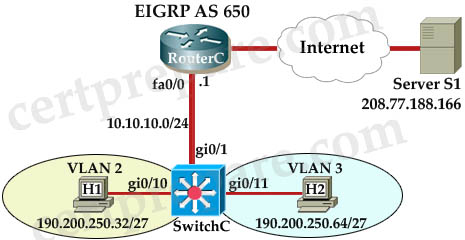
I am still not sure about the question but we need to configure the Multilayer Switch so that PCs from VLAN 2 and VLAN 3 can communicate with the Server.

Answer and Explanation
the config (commented by a certprepare.com’s reader but he does not leave his name, but please say thank to him!)
mls>enable
mls# configure terminal
mls(config)# int gi0/1
mls(config-if)#no switchport -> not sure about this command line, but you should use this command if the simulator does not let you assign IP address on Gi0/1 interface.
mls(config-if)# ip address 10.10.10.2 255.255.255.0
mls(config-if)# no shutdown
mls(config-if)# exit
mls(config)# int vlan 2
mls(config-if)# ip address 190.200.250.33 255.255.255.224
mls(config-if)# no shutdown
mls(config-if)# int vlan 3
mls(config-if)# ip address 190.200.250.65 255.255.255.224
mls(config-if)# no shutdown
mls(config-if)#exit
mls(config)# ip routing (Notice: MLS will not work without this command)
mls(config)# router eigrp 650
mls(config-router)# network 10.10.10.0 0.0.0.255
mls(config-router)# network 190.200.250.32 0.0.0.31
mls(config-router)# network 190.200.250.64 0.0.0.31
NOTE : THE ROUTER IS CORRECTLY CONFIGURED, so you will not miss within it in the exam , also don’t modify/delete any port just do the above configuration.
in order to complete the lab , you should expect the ping to SERVER to succeed from the MLS , and from the PCs as well.
If the above configuration does not work, you should configure EIGRP with “no auto-summary” command:
no auto-summary
Other lab-sims in this site:
LACP with STP Sim
VTP Lab 2
VTP Lab
Spanning Tree Lab Sim
AAAdot1x Lab Sim

I CONFIGURED THE INTERFACE OF THE SWTCH CONNECTED TO THE ROUTER NO SWITCHPORT
THEN IP ADDRESS 172.16.1.2 255.255.255.0 THEN ROUTER EIRGP 65010
NETWORK 172.16.1.0 0.0.0.255
NETWORK 192.168.3.32 0.0.0.31
NETWORK 192.168.3.64 0.0.0.31 BUT I DID’NT GET ANY NEIGHBOUR RELATIONT
THE HOSTS CAN PING EACH OTHERS BUT I CAN NOT PING THE SERVER
CAN ANY ANE TELL ME THE PROBLEM
Doy you have introduced the ip routing command?
you wont be able to add ANY router commands without entering the ip routing command first.
perhaps you need the no auto summary command under eigrp?
Check the other router at the top of the topology because in the packet tracer labs it’s configured as eigrp 65 not 65010 because I had the same problem. Hope that helped. Try it with AS 65 instead and you should get the relationships.
HOW THE TWO VLANS CAN PING EACH OTHER IF I NEED IP ROUTING. I THINK WITHOUT IP ROUTING THE TWO VLAN WON’T PING EACH OTHER. I ALSO CHECKED THE ROUTER EIGRP AND IT WAS 65010 SAME AS THE ONE I CONFIGURED IN THE SWITCH INTEFACE. BUT STILL NO NEIGHBOR RELATIONSHIP.
ALSO WHEN I WROTE NO AUTO SUMMARRY I GOT A MESSAGE SAYING YOU DON’T NEED THIS COMMAND TO COMPLETE THIS SIMULATION. SO WHAT IS THE PROBLEM? IS THERE ANY HIDDEN STUFF.
check to make sure that you are using different ip addresses for the link between the router and the switch, the router will tell you duplicate addresses are being used but the switch wont always tell you. i just went though this simulation on packet tracer and i entered the wrong ip address on the switch by accident and no neighbor relationships formed until i corrected that mistake, also check the ports connected to the 2 vlans, they may not be set up for access ports into their respective vlans.
To TERA: the autonomous system number you’ve assigned to the eigrp process is incorrect. You typed: “THEN ROUTER EIRGP 65010″
but it had to be ROUTER EIRGP 650. this mismatch in the autonomous system number caused failure in neighbor relationship.
Hi TERA,
you need to configure vlan sub interfaces for the hosts and you also need to assign the ip route command to the switch.
if you look at the diagram at the time it should show you the IP of the router if not, before you do anything do a show run and see if it has gateway setup.
Once you issue command ip routing your gateway is no longer used. you have to use this command.
ip routing 0.0.0.0 0.0.0.0 ip_of_router
you are not allowed to use ip route or static route every thing should learn via eirgp. and it is specificaly told to use AS 65010 not 650.
@Frank??? You learn the routes using eigrp.. Its the objetive of the practice.. Why you introduce default gateway??? Please not confuse the people.
Hey, I am checking this blog using the phone and this appears to be kind of odd. Thought you’d wish to know. This is a great write-up nevertheless, did not mess that up.
- David
i have done the above mentioned configuration..but still not able to ping the server..
i have used AS number 650
plz someone send me the latest switch dumps 640-813
the AS in this sim is 65 no 650
latest pass4sure link
http://rapidshare.com/files/445924349/SWITCH_642-813_Pass4sure_v6.7_487Q__Latest_.rar
Hoe to find the Server’s interface IP address to check the ping from host & MLS?
please can anyone send me the latest dump 4 the switch 642-813 exam..i ve scheduled it 4 next week..thanks charlesozy@yahoo.com… i wld be gladly happy to recieve dis
Anyone have idea about a simulation question [not VTP,VTP2, MLS with EIGRP, LACP with STP, STP, AAAdot1X] in almost all the dumps (P4S, Testking, flipper) with very long IOS commands as step 1, 2, 3,,,,,,,,,,, Becoz it’s too many pages. Need lot of time to finish.. Will it come for exam? Plz anyone tel me…!
hi guys
i am looking switching latest file can anyone send me on honey4u4u@hotmail.com this mail id
i ll be very thankful…
Planning to take up CCNP switch exam by next week. Anyone have recent the Pass4sure CCNP SWITCH 642-813.497q dumps? If anybody have passed the exam recently, please send the dumps to my mail bugra.kiymaz@gmail.com
@Tera
I had the same problem when I did “no auto” and the sim said I didn’t need to use the command
Not sure what was going on with that sim but it seem that I had everything configured correctly as you did. I was able to get each of the host to ping the default gateway of the router but could not ping the server. I honestly think something was wrong with that sim.
and you are correct, the router eigrp AS is 65010, in which the sim specified it. The only way I was able to get the hosts to ping the server was to add a network statement under eirgp for the server, but the instructions specifically said that to only use the subnets that were listed. I had spent to much time on this sim trying to figure out why the hosts nor the switch could not ping the server…..
my config
mls(config)#int gi0/1
mls(config-if)#no switchport
mls(config-if)#ip address 172.16.1.2 255.255.255.0
mls(config-if)#no shutdown
mls(config-if)#exit
mls(config)#int vlan 2
mls(config-if)#ip address 192.168.3.33 255.255.255.224
mls(config-if)#no shut
mls(config-if)#int vlan 3
mls(config-if)#ip address 192.168.3.65 255.255.255.224
mls(config-if)#no shutdown
mls(config-if)#exit
mls(config)#ip routing
mls(config)#router eigrp 65010
mls(config-router)#network 172.16.1.0 0.0.0.255
mls(config-router)#network 192.168.3.32 0.0.0.31
mls(config-router)#network 192.168.3.64 0.0.0.31
mls(config-router)#exit
mls(config)#exit
Note: again the sim would not allow the “no auto command” also the router was unavailable to check it’s config
Did anyone else have a similar problem as Tera and myself
@CCNP_Hopeful
I took the exam yesterday, and found that I got an error when I entered the following network statement:
mls(config)#router eigrp 65010
mls(config-router)#network 172.16.1.0 0.0.0.255
mls(config-router)#network 192.168.3.32 0.0.0.31
mls(config-router)#network 192.168.3.64 0.0.0.31
I got the error of “discontiguous networks” which would be true since we are using EIGRP and not BGP. You cannot have different wildcard masks in the network statements under EIGRP so I entered this instead and was able to ping the server perfectly:
mls(config)#router eigrp 65010
mls(config-router)#network 172.16.1.0 0.0.0.255
mls(config-router)#network 192.168.3.0 0.0.0.255
Changing the wildcard encompasses but the .32 and .64 subnets. Hope this helps!!
question about EIGRP.
Is the AS stated in question or will I need to log into router and use “ip eigrp topology” command to find?
Does the exam say to use such a specific mask? as a wild mask of 0.0.0.31
Couldn’t we use – less specific
network 172.16.0.0
network 192.168.3.0
@anonymous
@tera
@ccnp hopeful
ive got the same problem.
my config:
router eigrp 65010
network 172.16.0.0 255.255.0.0
network 192.168.3.32 255.255.255.224
network 192.168.3.64 255.255.255.224
no auto-summmary <–this didnt work
result
hosts can ping each other and the switch but cannot pint to server.
note:
i also accidentally configured
ip default-gateway 192.168.1.1
and i cannot undo it. the simlet just wont allow me to undo it.
@mat1105
when you configure EIGRP, you have to use wildcard mask: 0.0.255.255 and 0.0.0.31 respectively.
@CDP
thanks for the correction. follow up question,
How do we know or check that the AS for eigrp is 65010, running in the router?
what would be the necessary verification commands.
@CDP
comment:i tried in MLS switch 3560 and router 2511 using the subnet mask instead of the wilcard bits. command is accepted and results were the same.
when show runn it displays 0.0.0.31.
i dont mean to confuse anyone, but cisco best practice is to use wildcard bits…
In the real world (including Jeremy-CBT Nuggets), most engineers use the classful mask bits in the ‘network’ command with the ‘no auto’ command. This practice is widely accepted. The no auto will advertise the subnets from the interfaces and not the whole class.
So I would assume the exam sim would be similar since
Please ensure the VLAN interfaces are up
The subnets will not show in ip route until the interfaces are active
what if we did :
mls(config)#router eigrp 65010
mls(config-router)#network 172.16.1.0
mls(config-router)#network 192.168.3.32
mls(config-router)#network 192.168.3.64
seems to work in packet tracer. but on a router i guess it will auto summarize
@swicth
yes it auto summarizes to the classfull with or without the “no auto” command.
result:
!
router eigrp 65010
no auto-summary
network 172.16.0.0
network 192.168.3.0
So what should the existing config of the router be? I’m trying to replicate scenario. Also before anything is attempted in sim should the switch be able to ping the server? Cheers.
eigrp autosummarizes by default.
Was able to use this config on test today.
mls(config)#router eigrp 65010
mls(config-router)#network 172.16.1.0 0.0.0.255
mls(config-router)#network 192.168.3.32 0.0.0.31
mls(config-router)#network 192.168.3.64 0.0.0.31
Asked to use lowest ip address on routed interface. Easy to find out, just use:
mls(config)#sh cdp neighbor detail
routers ip was 172.16.1.1/24 so i used 172.16.1.2/24
@ CDUB, where you able to ping the server ??/
Got this question today – passed the exam
the no switchport command is essential as it makes the port layer 3
and no auto-summmary is not needed!
and for me ping worked perfect between the two hosts
use ipconfig on the hosts to see their default gateway address and ensure that is what you configure on the VLAN interface
ip routing is essential if you do not do this ping wont work
I failed this exam, but I did however get this sim working.
above comments about routed ports and SVIs are spot on (see CCNP_Hopeful)
EIGRP network commands:
router eigrp 123 (sim tells you specific as number to use)
network 10.0.0.0
network 192.168.0.0
You can use the classfull network of the vlans & routed interface to enable eigrp for the interfaces
you dont need to use no auto-summary command
Good luck everyone. Hope im 3rd time lucky!
Dear CCNP Friends,
Here is the order of the configuration
************************************************************************************************************************************************
The no switchport command makes the interface of Gi0/1 a Layer 3 port, this will allow you to configure an ip address
mls>enable
mls#config t
mls(config)#interface Gi0/1
mls(config-if)#no switchport
mls(config-if)#IP ADDRESS 172.16.1.2 255.255.255.0
mls(config-if)#no shut
mls(config-if)#exit
mls(config)#end
mls#
************************************************************************************************************************************************
To configure eigrp routing protocol, you must use the classful summary of the network, please do not add wild card mask. It is absolutely unneccessary, since at the end of the configuration, you will use no auto-summary.
mls#config t
mls(config)#router eigrp 65010
mls(config-router)#network 172.16.1.0
mls(config-router)#network 192.168.3.0
mls(config-router)#no auto-summary
mls(config-router)#end
mls#
NOTE : THE NETWORK 192.168.3.32 AND 192.168.3.64 HAS BEEN SUMMARIZED TO 192.168.3.0 . This is the classful summary of the two network. Read about summarization of network addresses
************************************************************************************************************************************************
Please, do not miss lead others by posting a wrong configuration.
@ Professional Advice
So we don’t need the command “ip routing” at any point?
Oh, i put down the wrong network statements on here, but in the exam i didn’t.
The reason why you would use no auto summ is when you have a discontiguous network. You just summarise manually. But that’s not relevant to this exam. More of a ROUTE topic.
@ confused, ip routing should be enabled….globally.
@confused
For you to enable Layer 3 capability of the MLS, and to implement routing, you must globally enable ip routing i.e
mls(config)#ip routing
************************************************************************************************************************************************
@RandomGeeza
Yes i strongly agree “no auto-summary” is necessary for a discontiguous network. First, you need to ask yourself “what is the function of the command “no auto-summary” in a router for eigrp routing protocol.
This command tells the router to advertise the subnet mask of the network without automatic summarization at the routing table.
The problem of discontiguous network is for RIPV2,so that packets could be sent to their required network.
Those that manually added the wildcard mask of the network, do not need to put the command “no auto-summary” because “no auto-summary or wildcard mask is doing thesame thing, telling the router to advertise their subnets.
IMPORTANT NOTE
****************************************************************************************************************************************************
FOR EIGRP ROUTING PROTOCOL;
The standard way of implementing it both in production environment and cisco exam is by entering the classful network of the given network.
The different in entering no auto-summary and not entering the command is in the routing table. The routing table will be populated by the individual networks with their respective subnet mask. While without “no auto-summary” you will only the major classfull network.
When you are toubleshooting, your configuration will know that it is important to add “no auto-summary” in the command sequence when configuring eigrp routing problem like below:
************************************************************************************************************************************************
RECOMMENDED CONFIGURATION SEQUENCE FOR EIGRP ROUTING PROTOCOL
mls#config t
mls(config)#router eigrp 65010
mls(config-router)#network 172.16.1.0
mls(config-router)#network 192.168.3.0
mls(config-router)#no auto-summary
mls(config-router)#end
mls#
************************************************************************************************************************************************
@profesional advice or all
you are saying that this is already in their?
and
not to bother to re- add it?
mls(config)# int vlan 2
mls(config-if)# ip address 190.200.250.33 255.255.255.224
mls(config-if)# no shutdown
mls(config-if)# int vlan 3
mls(config-if)# ip address 190.200.250.65 255.255.255.224
mls(config-if)# no shutdown
mls(config-if)#exit
Take the exam today, everything you need to pass is on http://www.careercert.info. CBT nuggets, latest P4S, official cisco ebooks, etc.
@Renie
I believe you have a good domain knowledge of configuring a cisco device. For MLS configuration, there are four configurations needed:
1. Enabling the routing port using no switchport command
2. Configuring Switch virtual Interface (SVI)
3. Enabling layer 3 capabilities using ip routing command
4. Configuring a dynamic routing protocol or static routing as the case may be.
In my explanation, I only spoke about 1, 3, and 4. because no one had a problem in configuring SVI , so there was no need for me to speak about it. The configuration you showed above is correct and it is very important, otherwise the switch cannot do inter-vlan routing. You should not expect me to do everything or explain everything. I only restricted my explanation to the problem people were confused about.
Well Lads, Do we add the 10.10.10.0 subnet too or is that not needed as it is a directly connecting network?? In other words should the routing part of this question be configured as
mls(config)# ip routing
mls(config)# router eigrp 650
mls(config-router)#network 10.10.10.0 0.0.0.255
mls(config-router)#network 172.16.1.0 0.0.0.255
mls(config-router)#network 192.168.3.32 0.0.0.31
mls(config-router)#network 192.168.3.64 0.0.0.31
I am struggling to find a better way to practice CCNP SWITCH LABS. ANYHELP?. In return i will give you the latest dump from p4sure & TE including other googies that will blow your mind away.
Passed switch today..i got the same question but the figure had a different look..but it was same as given here.We will not first understand that it is the EIGRP lab…so dont panic ,give the comments as given here…thanks a lot guys!!
Where can I download pass4sure?
It is very easy to configure and implement in relation to the OSPF or EIGRP. However this issues can be eliminated by using point-to-point sub-interfaces..In order to use dynamic routing in Hub-and-Spoke topology sub-interfaces for each link have to be configured and link must be defined as point-to-point.. Router wont accept routing update sent using MD5-hashed password when it was configured for clear-text authentication. Best way to troubleshoot authenticated updates is debug ip rip command..
Does anyone has the exact question for this sim?
Hi Jain,
Please give the dumps for CCNP Switch.
Send mail to kumarasmy321@gmail.com
Thanks
looking for dumps for SWITCH and T-SHOOT.
Anyone??
ian_2_ian@yahoo.com
Thanks in advance.
The question state that ” The Routed interface MUST use the lowest available IP address on a subnet (172.16.1.0). Should’nt this be 172.16.1.1?
Pass my SWITCH exam this morning. If you want to know, Drop me a line
donald.bart-williams@stjohns.surrey.sch.uk
Could anyone of you please put the configuration down clearly. Splitting it in to chunk of statements like professional did.
Hi DBW, kudos for passing. wot dumps did you use for your exam. plus are there any changes like in drag and drop questions and generally. thanks
Here are the complete commands:
mls#config t
mls(config)#interface Gi0/1
mls(config-if)#no switchport
mls(config-if)#ip address 172.16.1.2 255.255.255.0
mls(config-if)#no shut
mls(config-if)#exit
mls(config)#interface vlan 2
mls(config-if)#ip address 192.168.3.33 255.255.255.224
mls(config-if)#no shut
mls(config-if)#exit
mls(config)#interface vlan 3
mls(config-if)#ip address 192.168.3.65 255.255.255.224
mls(config-if)#no shut
mls(config-if)#exit
mls(config)#ip routing
mls(config)#router eigrp 65010
mls(config-router)#network 172.16.1.0
mls(config-router)#network 192.168.3.0
mls(config-router)#no auto-summary
You are true packet head,it’s the correct one
anyone who just have passed the exam of ip switching please tell me what question would he ask about this lab and how to configure this lab.
In the lab sim created for packet tracer. PacketHeads method works, just one caveat in the sim is that ports connecting the pc need to be added to the vlan and made into access port. I assume this is already done on the exam but you can double check with show run command
When I took the exam, it would not let me use the command (no auto-summary) because a pop-up window informed me that it was not needed in the sim.
So I added the network statements to be on the safe side.
To butt,
this lab was in my exam but without these IPs and eigrp NO was 65010
now the configuration :
all will be on MLS
mls(config)#int gi0/1
mls(config-if)#no switchport
mls(config-if)# ip address 10.10.10.2 255.255.255.0
mls(config-if)# no shutdown
mls(config-if)# exit
mls(config)# int vlan 2
mls(config-if)# ip address 190.200.250.33 255.255.255.224
mls(config-if)# no shutdown
mls(config-if)# int vlan 3
mls(config-if)# ip address 190.200.250.65 255.255.255.224
mls(config-if)# no shutdown
mls(config-if)#exit
mls(config)#int gi0/10
mls(config-if)#switchport mode access
mls(config-if)#switchport access vlan 2
mls(config-if)#no shutdown
mls(config-if)#exit
mls(config)#int gi0/11
mls(config-if)#switchport mode access
mls(config-if)#switchport access vlan 3
mls(config-if)#no shutdown
mls(config-if)#exit
mls(config)# router eigrp 65010
mls(config-router)# network 10.10.10.0 0.0.0.255
mls(config-router)# network 190.200.250.32 0.0.0.31
mls(config-router)# network 190.200.250.64 0.0.0.31
mls(config)# ip routing
finally ping
note: I configured mls with IPs in this site but in exam there will be another IPs but with the same configuration and masks
To butt ,
The question was to ping from Host 1 and Host 2 the server.
also ping from MLS the server ( so you ping from enable mode)
thank you very much Rocket boy. but tell me one thing that would he give these subnets and IP ADDRESS
to Rocket boy
please tell me when did you take your exam. in Wild card mask is essential to give we can go without wild card mask.
question was easy to understand or not.
Maybe you’ll want to add a twitter button to your website. I just bookmarked the url, although I must do this manually. Just my $.02 :)
Hi guys,
can any please give clarification on the different configurations (e.g that of ‘Packet head’ and that of ‘rocket’) .That of ‘packet head ‘ is in conformity with the config in Todd Lamme’s CCNA text but i keep seeing people posting solutions similar to that of ‘Rocket’.
Which is correct. Can anyone clarify.
To butt ,
Sorry for late …I took my exam 7/April/2011…You must obtain subnets and IP ADDRESS by yourself and this will be done by clicking on each host icon, then write ipconfig and you will obtain ip addresses of the host and default gateway ….you will use default gateway ip address as an ip address of the interface of MLS connected with it.(Note: in exam it will be asked to use the lowest ip address of the network when configuring MLS interfaces) …you can use this web site for labs http://WWW.ccnpswitch.net
rocket89 THANK YOU for this link.
but can you tell me after clicking on the host i shall write it on command prompt (ipconfig)to get ip subnet and default gateway. then i should configure interface vlan 2 and give ip addres which will be the default gateway of the pc in vlan 2. and same for the interface vlan 3. please confirm me.
can you tell me about other sims as well. lacp and AAA dot1x. as lacp is quite long and sometimes disturbing.
thank you very much again.
hello rocket;
do i should create vlans first by the follwing commands
mls(config)#vlan 2
mls(config-vlan)#exit
mls(config)#vlan 3
mls(config-vlan)#exit
To malak,
No you shouldn’t….They are created by default.
Read the configuration i wrote above.
To butt,
yes as you said but remember to give the lowest ip in the network to int vlan 2 which will be the first ip in the network……the same for int vlan 3.
Go to AAA lab in cetprepare and use it with no change and you will get full mark.
for lacp you will be asked to make switch B as switch A (vtp mode ) so, you must use command show Vtp status at A which will appear to you as a Transparent ,so make B Transparent.
also you must change native vlan to 99 as he will ask you to transport it tagged.
the command no switch port access vlan 98 has no benefit…don’t use it.
Butt, use the rest of the configuraton as in CCNPswitch.net as it is
to ROCKET
thank you very much .
but here is more question for you. how did you solve your HOTSPOT question. did your enter command every time you read a question or just select it as it is on the dumps.
and answers were same or different.
reply me early as i am about to take my exam just after a few days.
To butt,
you enter show running-config one time on both MLS and hence see HSRP configuration on each one ….Read certprepare (Only one Q was outside)…..The answers are the same…it is so easy in my opinion.
Are the wildcard masks needed in the eigrp config? This thread has conflicting posts. Thanks!
Building configuration…
Current configuration : 1500 bytes
!
version 12.2
no service timestamps log datetime msec
no service timestamps debug datetime msec
no service password-encryption
!
hostname Switch
!
!
!
ip routing
!
!
!
!
!
!
!
!
ip name-server 0.0.0.0
!
!
!
!
!
!
interface FastEthernet0/1
switchport access vlan 2
switchport mode access
spanning-tree portfast
!
interface FastEthernet0/2
switchport access vlan 3
switchport mode access
spanning-tree portfast
!
interface FastEthernet0/3
no switchport
ip address 10.10.10.2 255.255.255.0
duplex auto
speed auto
!
interface FastEthernet0/4
!
interface FastEthernet0/5
!
interface FastEthernet0/6
!
interface FastEthernet0/7
!
interface FastEthernet0/8
!
interface FastEthernet0/9
!
interface FastEthernet0/10
!
interface FastEthernet0/11
!
interface FastEthernet0/12
!
interface FastEthernet0/13
!
interface FastEthernet0/14
!
interface FastEthernet0/15
!
interface FastEthernet0/16
!
interface FastEthernet0/17
!
interface FastEthernet0/18
!
interface FastEthernet0/19
!
interface FastEthernet0/20
!
interface FastEthernet0/21
!
interface FastEthernet0/22
!
interface FastEthernet0/23
!
interface FastEthernet0/24
!
interface GigabitEthernet0/1
!
interface GigabitEthernet0/2
!
interface Vlan1
no ip address
shutdown
!
interface Vlan2
ip address 192.200.250.33 255.255.255.224
!
interface Vlan3
ip address 192.200.250.65 255.255.255.224
!
router eigrp 65
network 190.200.0.0
network 10.0.0.0
no auto-summary
!
ip classless
!
!
!
!
!
!
!
!
!
line con 0
line vty 0 4
login
!
!
!
end
this mls config
bt i cant ping frm host to host
I see 2 diffrent configurations for MLS eigrp one with switch access the other not ? makes a difrrence ? on the gi0/11 – 12
Hello all could some one provide us with a link to down load simulation labs and practice on them for exam
it will be very helpful
thanks in advance
saadhh_007@yahoo.com
hey guys,i passed my switch exam today with 965. thanky guys very much.
i had this lab
in which have to login either switch or router
pls suggest me
Hi Star, please can u tell me the following details,
AAAdot1x Lab Sim – Do we need to add switchport access vlan 20 ?? And how can we check if our lab is correct ?
LACP with STP – Which are the correct commands u used for this lab ? and how can we check in the end that the lab is correct…
Please let me know as soon as possilble.
Sitting for the exam tommorow
Thanks for your kind Co-operation
Regards,
Haseeb Sheikh
should we add vlans 2,3 on the MLS ? it is clearly saying on the question , that we should do not add, delete vlans, and change port vlan assignment…
I took my exam today. There was this simlab. But the command “no auto-summary” did not work. You have to define the networks for eigrp with wildcards. Then it works for me…
@berns
what ip address u got????
I got the networks
172.16.1.0/24
192.168.3.32/27
192.168.3.64/27
and
AS 65010
hi guys,
i tried creating svi on the MLS included in cisco packet tracer 5
**config mode
int vlan 4
ip add—-
no shut
exit
i then did a *sh ip int br* in en mode
but the the svi for vlan 4 shows ***down down***
any ideas why this is so ?
Hello,
I just pass SWITCH today 923 score. this sim was there with the same networks/AS as berns mentioned. i did not try no auto-summary you don’t need it anyway since you are using the wild card masks.
follow the configuration as it is here and in the router eigrp as 65010 type networks with wild card mask without no auto-summary , ping !!!!! :) copy run start will not work with any sim. just make sure you verify your config by pinging the server and hosts and that’s it.
@mostafa…how about the other labs..what areas were they on ?
@ Jahboi, The Labs I got on 15/05/2011, was LACP + STP, MLS + EIGRP, and aaa + dot1x.
@mostafa…ok..thanks
mostafa.. Pls tell which dumps are valid in 813??
@help
P4S 497 questions. Everything was from there. Study and understand the concepts first, then practice alot with the commands and go for it. Then last thing, looks at the P4S. I assure you, you will pass :)
Hey dudes,
passed today with 96,7% (means 967/1000). First i’d like to thank you for this great job you’re doin here. Alright guys. This solution for this lab is 100% true and valid. I mean honistly if you sit down and learn a bit, this lab should be really clear to you. The only things you have to take care about, are the wildcard bits instead of the subnetmask in advertising the networks. The command “router eigrp xxx” + “no auto summary” will be answered by the lab system with “Its not a neccessary command for successfully finish the lab.” “xxx” is the autonomus systemnumber, depends on you lab.
Hi
can any one tell If the access ports Gi 0/10 and Gi 0/11 have to be defined in VLANS 2 and 3 respectively or is it already done for you ?
Thanks
Razi