
STP Questions 3
Here you will find answers to STP Questions – Part 3
Question 1
What is the result of entering the command spanning-tree loopguard default?
A. The command enables both loop guard and root guard.
B. The command changes the status of loop guard from the default of disabled to enabled.
C. The command activates loop guard on point-to-multipoint links in the switched network.
D. The command will disable EtherChannel guard.
Answer: B
Explanation
This command is used in global configuration mode to enable loop guard on all ports of a given switch. To disable it, use the “no” keyword at the beginning of this command.
Question 2
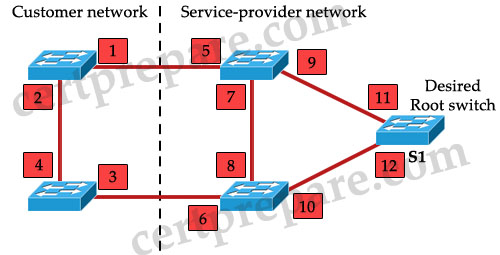
Refer to the exhibit. The service provider wants to ensure that switch S1 is the root switch for its own network and the network of the customer. On which interfaces should root guard be configured to ensure that this happens?
A. interfaces 1 and 2
B. interfaces 1,2,3, and 4
C. interfaces 1, 3, 5, and 6
D. interfaces 5 and 6
E. interfaces 5, 6, 7, and 8
F. interfaces 11 and 12
Answer: D
Explanation
Let’s see what will happen if we set port 5 & 6 as “root guard” ports:
First, notice that the “root guard” command cannot be used on root switch (because this command is based on blocked port – while a root switch can’t have a blocked port -> two middle switches cannot become root bridges.
Moreover, the neighbor switch which has its port connected with this “root guard” port can’t be the root bridge. For example if we configure port 6 as “root guard” port, the left-bottom switch (the switch with ports 3, 4) can’t be root bridge because that will make port 6 root port. Therefore by configuring port 5 & 6 as “root guard” ports, two switches in the “Customer network” cannot become root bridge.
Note: Root guard should be enabled on the ports (on the Network Provider side) which are connected to the customer network where a hacker can easily exploit. In this question, root guard should be placed on port 5 & 6 to prevent customer’s switches try to become root switches. We can’t use Root guard on ports 7 & 8 because this feature is only used on designated ports, and it does not allow the port to become non-designated.
Question 3
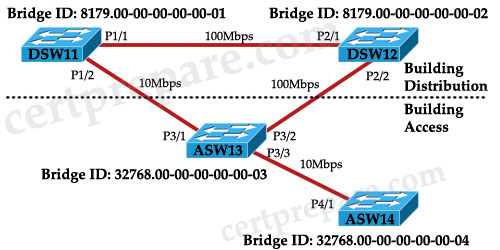
Examine the diagram. A network administrator has recently installed the above switched network using 3550s and would like to control the selection of the root bridge. Which switch should the administrator configure as the root bridge and which configuration command must the administrator enter to accomplish this?
A. DSW11(config)# spanning-tree vlan 1 priority 4096
B. DSW12(config)# set spanning-tree priority 4096
C. ASW13(config)# spanning-tree vlan 1 priority 4096
D. DSW11(config)# set spanning-tree priority 4096
E. DSW12(config)# spanning-tree vlan 1 priority 4096
F. ASW13(config)# set spanning-tree priority 4096
Answer: E
Explanation
First, only switches in Distribution section should become root bridge -> only DSW11 or DSW12 should be chosen.
The traffic passing root bridge is always higher than other switches so we should choose switch with highest speed connection to be root bridge -> DSW12 with two 100Mbps connections should be chosen.
Also, the correct command to change priority value for a specific VLAN is spanning-treee vlan VLAN-ID priority Priority-number.
Question 4
What must be the same to make multiple switches part of the same Multiple Spanning Tree (MST)?
A. VLAN instance mapping and revision number
B. VLAN instance mapping and member list
C. VLAN instance mapping, revision number, and member list
D. VLAN instance mapping, revision number, member list, and timers
Answer: A
Explanation
MST maps multiple VLANs that have the same traffic flow requirements into the same spanning-tree instance. The main enhancement introduced by MST raises the problem, however, of determining what VLAN is to be associated with what instance. More precisely, based on received BPDUs, devices need to identify these instances and the VLANs that are mapped to the instance.
To be part of a common MST region, a group of switches must share the same configuration attributes. In particular, the configuration name (or region name – 32 bits), revision number (16 bits), and VLAN mapping (associate VLANs with spanning-tree instances) need to be the same for all the switches within the same region.
An example of configuring MST on a switch is shown below:
| Configuration | Description |
| Switch(config)# spanning-tree mode mst | Turn on MST (and RSTP) on this switch |
| Switch(config)# spanning-tree mst configuration | Enter MST configuration submode |
| Switch(config-mst)# name certprepare | Name MST instance |
| Switch(config-mst)# revision 5 | Set the 16-bit MST revision number. It is not incremented automatically when you commit a new MST configuration. |
| Switch(config-mst)#instance 1 vlan 5-10 | Map instance with respective VLANs |
| Switch(config-mst)#instance 2 vlan 11-15 |
Question 5
Which three items are configured in MST configuration submode? (Choose three)
A. Region name
B. Configuration revision number
C. VLAN instance map
D. IST STP BPDU hello timer
E. CST instance map
F. PVST+ instance map
Answer: A B C
Explanation
Same as Question 4.
Question 6
Which three statements about the MST protocol (IEEE 802.1S) are true? (Choose three)
A. To verify the MST configuration, the show pending command can be used in MST configuration mode.
B. When RSTP and MSTP are configured; UplinkFast and BackboneFast must also be enabled.
C. All switches in the same MST region must have the same VLAN-to-instance mapping, but different configuration revision numbers.
D. All switches in an MST region, except distribution layer switches, should have their priority lowered from the default value 32768.
E. An MST region is a group of MST switches that appear as a single virtual bridge to adjacent CST and MST regions.
F. Enabling MST with the “spanning-tree mode mst” global configuration command also enables RSTP.
Answer: A E F
Explanation
The show pending command can be used to verify the MST configuration (pending configuration). An example of this command is shown below:
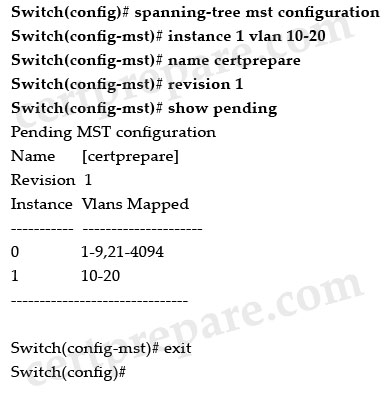
Note:
The above commands do these tasks:
+ Enter MST configuration mode
+ Map VLANs 10 to 20 to MST instance 1
+ Name the region certprepare
+ Set the configuration revision to 1
+ Display the pending configuration
+ Apply the changes, and return to global configuration mode
The MST region appears as a single bridge to spanning tree configurations outside the region -> a MST region appears as a single virtual bridge to adjacent CST and MST regions -> E is correct.
By enabling MST you also enable RSTP because MST relies on the RSTP configuration to operate -> F is correct.
Question 7
Which two statements concerning STP state changes are true? (Choose two)
A. Upon bootup, a port transitions from blocking to forwarding because it assumes itself as root.
B. Upon bootup, a port transitions from blocking to listening because it assumes itself as root.
C. Upon bootup, a port transitions from listening to forwarding because it assumes itself as root.
D. If a forwarding port receives no BPDUs by the max_age time limit, it will transition to listening.
E. If a forwarding port receives an inferior BPDU, it will transition to listening.
F. If a blocked port receives no BPDUs by the max_age time limit, it will transition to listening.
Answer: B F
Question 8
Which statement correctly describes the Cisco implementation of RSTP?
A. PortFast, UplinkFast, and BackboneFast specific configurations are ignored in Rapid PVST mode.
B. RSTP is enabled globally and uses existing STP configuration.
C. Root and alternative ports transition immediately to the forwarding state.
D. Convergence is improved by using sub-second timers for the blocking, listening, learning, and forwarding port states.
Answer: B
Explanation
To turn on RSTP, use this command in global configuration mode:
| Switch(config)# spanning-tree mode mst |
Note: This command turn on both MST & RSTP.
Question 9
The network administrator maps VLAN 10 through 20 to MST instance 2. How will this information be propagated to all appropriate switches?
A. Information will be carried in the RSTP BPDUs.
B. It will be propagated in VTP updates.
C. Information stored in the Forwarding Information Base and the switch will reply on query.
D. Multiple Spanning Tree must be manually configured on the appropriate switches.
Answer: D
Question 10
Which MST configuration statement is correct?
A. MST configurations can be propagated to other switches using VTP.
B. After MST is configured on a Switch, PVST+ operations will also be enabled by default.
C. MST configurations must be manually configured on each switch within the MST region.
D. MST configurations only need to be manually configured on the Root Bridge.
E. MST configurations are entered using the VLAN Database mode on Cisco Catalyst switches.
Answer: C