
STP Questions 4
Here you will find answers to STP Questions – Part 4
Question 1
While logged into a Company switch you issue the following command:
CompanySwitch(config-mst)#instance 10 vlan 11-12
What does this command accomplish?
A. It enables a PVST+ instance of 10 for vlan 11 and vlan 12
B. It enables vlan 11 and vlan 12 to be part of the MST region 10
C. It maps vlan 11 and vlan 12 to the MST instance of 10.
D. It creates an Internal Spanning Tree (1ST) instance of 10 for vlan 11 and vlan 12
E. It create a Common Spanning Tree (CST) instance of 10 for vlan 11 and vlan 12
F. It starts two instances of MST, one instance for vlan 11 and another instance for vlan 12.
Answer: C
Explanation
MST maps multiple VLANs that have the same traffic flow requirements into the same spanning-tree instance. The main enhancement introduced by MST raises the problem, however, of determining what VLAN is to be associated with what instance. More precisely, based on received BPDUs, devices need to identify these instances and the VLANs that are mapped to the instance.
An example of configuring MST on a switch is shown below:
| Configuration | Description |
| Switch(config)# spanning-tree mode mst | Turn on MST (and RSTP) on this switch |
| Switch(config)# spanning-tree mst configuration | Enter MST configuration submode |
| Switch(config-mst)# name certprepare | Name MST instance |
| Switch(config-mst)# revision 5 | Set the 16-bit MST revision number. It is not incremented automatically when you commit a new MST configuration. |
| Switch(config-mst)#instance 1 vlan 5-10 | Map instance 1 with respective VLANs (VLAN 5 to 10) |
| Switch(config-mst)#instance 2 vlan 11-15 | Map instance 2 with respective VLANs (VLAN 11 to 15) |
Note: To be part of a common MST region, a group of switches must share the same configuration attributes. In particular, the configuration name (or region name – 32 bits), revision number (16 bits), and VLAN mapping (associate VLANs with spanning-tree instances) need to be the same for all the switches within the same region.
Question 2
By default, all VLANs will belong to which MST instance when using Multiple STP?
A. MST00
B. MST01
C. the last MST instance configured
D. none
Answer: A
Explanation
By default, all VLANs are assigned to MST instance 0. Instance 0 is known as the Internal Spanning-Tree (IST), which is reserved for interacting with other Spanning-Tree Protocols (STPs) and other MST regions.
Question 3
What will occur when a nonedge switch port that is configured for Rapid Spanning Tree does not receive a BPDU from its neighbor for three consecutive hello time intervals?
A. RSTP information is automatically aged out.
B. The port sends a TCN to the root bridge.
C. The port moves to listening state,
D. The port becomes a normal spanning tree port.
Answer: A
Explanation
In STP 802.1D, a non-root bridge only generates BPDUs when it receives one on the root port. But in RSTP 802.1w, a bridge sends a BPDU with its current information every hello-time seconds (2 by default), even if it does not receive any from the root bridge. Also, on a given port, if hellos are not received three consecutive times, protocol information can be immediately aged out (or if max_age expires). Because of the previously mentioned protocol modification, BPDUs are now used as a keep-alive mechanism between bridges. A bridge considers that it loses connectivity to its direct neighbor root or designated bridge if it misses three BPDUs in a row. This fast aging of the information allows quick failure detection. If a bridge fails to receive BPDUs from a neighbor, it is certain that the connection to that neighbor is lost. This is opposed to 802.1D where the problem might have been anywhere on the path to the root.
(Reference: http://www.cisco.com/en/US/tech/tk389/tk621/technologies_white_paper09186a0080094cfa.shtml)
Question 4
A port in a redundant topology is currently in the blocking state and is not receiving BPDUs. To ensure that this port does not erroneously transition to the forwarding state, which command should be configured to satisfy the requirement?
A. Switch(config)#spanning-tree loopguard default
B. Switch(config-if)#spanning-tree bpdufilter
C. Switch(config)#udld aggressive
D. Switch(config-if)#spanning-tree bpduguard
Answer: A
Explanation
Loop guard prevents alternate or root ports from becoming the designated port due to a failure that could lead to a unidirectional link. An example is shown below:
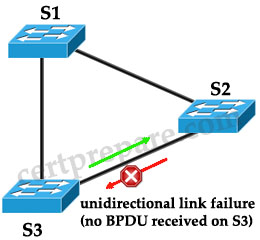
Suppose S1 is the root bridge. S3′s port connected with S2 is currently blocked. Because of unidirectional link failure on the link
between S2 and S3, S3 is not receiving BPDUs from S2.
Without loop guard, the blocking port on S3 will transition to listening (upon max age timer expiration) -> learning -> forwarding state which create a loop.n
With loop guard enabled, the blocking port on S3 will transition into the STP loop-inconsistent state upon expiration of the max age timer. Because a port in the STP loop-inconsistent state will not pass user traffic, no loop is created. The loop-inconsistent state is effectively equal to the blocking state.
To enable loop guard globally use the command spanning-tree loopguard default.
Question 5
You are the administrator of a switch and currently all host-connected ports are configured with the portfast command. You have received a new directive from your manager that states that, in the future, any host-connected port that receives a BPDU should automatically disable PortFast and begin transmitting BPDUs. Which of the following commands will support this new requirement?
A. Switch(config)# spanning-tree portfast bpduguard default
B. Switch(config-if)# spanning-tree bpduguard enable
C. Switch(config-if)# spanning-tree bpdufilter enable
D. Switch(config)# spanning-tree portfast bpdufilter default
Answer: D
Explanation
The bpdufilter option feature is used to globally enable BPDU filtering on all Port Fast-enabled interfaces and this prevent the switch interfaces connected to end stations from sending or receiving BPDUs.
Note: The spanning-tree portfast bpdufilter default global configuration command can be overridden by the spanning-tree bdpufilter enable command in interface mode.
Question 6
Which two statements correctly describe characteristics of the PortFast feature? (Choose two)
A. STP will be disabled on the port.
B. PortFast can also be configured on trunk ports.
C. PortFast is required to enable port-based BPDU guard.
D. PortFast is used for both STP and RSTP host ports.
E. PortFast is used for STP-only host ports.
Answer: B D
Explanation
You can use PortFast on switch or trunk ports connected to a single workstation, switch, or server to allow those devices to connect to the network immediately, instead of waiting for the port to transition from the listening and learning states to the forwarding state -> B is correct.
Also, PortFast can be used for both STP and RSTP -> D is correct.
(Reference: http://www.cisco.com/en/US/docs/switches/lan/catalyst4000/7.4/configuration/guide/stp_enha.html)
Answer C is not correct because BPDU guard can be enabled without PortFast. But what will happen if the PortFast and BPDU guard features are configured on the same port?
Well, at the reception of BPDUs, the BPDU guard operation disables the port that has PortFast configured. The BPDU guard transitions the port into errdisable state, and a message appears on the console
| 2000 May 12 15:13:32 %SPANTREE-2-RX_PORTFAST:Received BPDU on PortFast enable port. Disabling 2/1 2000 May 12 15:13:32 %PAGP-5-PORTFROMSTP:Port 2/1 left bridge port 2/1 |
(Reference and good resource: http://www.cisco.com/en/US/tech/tk389/tk621/technologies_tech_note09186a008009482f.shtml)
Question 7
Which of the following commands can be issued without interfering with the operation of loop guard?
A. Switch(config-if)#spanning-tree guard root
B. Switch(config-if)#spanning-tree portfast
C. Switch(config-if)#switchport mode trunk
D. Switch(config-if)#switchport mode access
Answer: C
Explanation
PortFast & Root guard should be placed on ports configured as access ports while loop guard should be placed on trunk ports -> we can use the “switchport mode trunk” without interfering with the operation of loop guard.
Question 8
Which statement correctly describes enabling BPDU guard on an access port that is also enabled for PortFast?
A. Upon startup, the port transmits 10 BPDUs. If the port receives a BPDU, PortFast and BPDU guard are disabled on that port and it assumes normal STP operation.
B. The access port ignores any received BPDU.
C. If the port receives a BPDU, it is placed into the error-disable state.
D. BPDU guard is only configured globally and the BPDU filter is required for port-level configuration.
Answer: C
Explanation
If any BPDU is received on a port where BPDU guard is enabled, that port is put into the err-disable state immediately. The port is shut down in an error condition and must be either manually re-enabled or automatically recovered through the errdisable timeout function.
Note: A port that has PortFast enabled also has BPDU guard automatically enabled. By combining PortFast & BPDU guard we have a port that can quickly enter the Forwarding state from Blocking state and automatically shut down when receiving BPDUs.
Question 9
Why is BPDU guard an effective way to prevent an unauthorized rogue switch from altering the spanning-tree topology of a network?
A. BPDU guard can guarantee proper selection of the root bridge.
B. BPDU guard can be utilized along with PortFast to shut down ports when a switch is connected to the port.
C. BPDU guard can be utilized to prevent the switch from transmitteing BPDUs and incorrectly altering the root bridge election.
D. BPDU guard can be used to prevent invalid BPDUs from propagating throughout the network.
Answer: B
Question 10
Which three statements about STP timers are true? (Choose three)
A. STP timers values (hello, forward delay, max age) are included in each BPDU.
B. A switch is not concerned about its local configuration of the STP timers values. It will only consider the value of the STP timers contained in the BPDU it is receiving.
C. To successfully exchange BPDUs between two switches, their STP timers value (hello, forward delay, max age) must be the same.
D. If any STP timer value (hello, forward delay, max age) needs to be changed, it should at least be changed on the root bridge and backup root bridge.
E. On a switched network with a small network diameter, the STP hello timer can be tuned to a lower value to decrease the load on the switch CPU.
F. The root bridge passes the timer information in BPDUs to all routers in the Layer 3 configuration.
Answer: A B D
Explanation
Each BPDU includes the hello, forward delay, and max age STP timers. An IEEE bridge is not concerned about the local configuration of the timers value. The IEEE bridge considers the value of the timers in the BPDU that the bridge receives. Effectively, only a timer that is configured on the root bridge of the STP is important. If you lose the root, the new root starts to impose its local timer value on the entire network. So, even if you do not need to configure the same timer value in the entire network, you must at least configure any timer changes on the root bridge and on the backup root bridge.
(Reference: http://www.cisco.com/en/US/tech/tk389/tk621/technologies_tech_note09186a0080094954.shtml)

for Q.6==> i think answer should be A and D. Pls confirm if i am wrong
No, the port still partecipate to the STP and so it is able to recognize a loop.
“In order to allow immediate transition of the port into forwarding state, enable the STP PortFast feature. PortFast immediately transitions the port into STP forwarding mode upon linkup. The port still participates in STP. So if the port is to be a part of the loop, the port eventually transitions into STP blocking mode.”
http://www.cisco.com/en/US/tech/tk389/tk621/technologies_tech_note09186a008009482f.shtml
Q.5
I think is missing something…
the CCNP switch giude says the bpdu filtering effectively disable STP, and don’t says nothing about automatically disable PortFast when BPDUs are receives. More it remember “be very careful to enable bpdu filtering only under cotrolled circumstances in which you are absolutely sure that a switch port will have a single host connected and that a loop will be impossible. Enable BPDU fitering only if the connected device cannot allow BPDUs to be accepted or sent. Otherwise, you should permit STP to operate on the switch port as a precaution.”
Please if there is another explanation give me. I will do the exame in 10 days. thanks
@Mastrodonte
My understanding of BPDU filtering is that it’s a method to cut back on traffic being sent from the switch so if it’s enabled, it’s not sending any BPDUs out any port that it’s not receiving BPDUs. That way it’s less traffic. If a BPDU is received on a port, then it will immediately disable BPDU on just THAT specific port and participate in STP normally. A loop is possible because BPDU filtering doesn’t stop someone from plugging in a switch to that port and start sending BPDUs and cause a reconvergence of STP. This is where BPDU Guard comes in. It will put the port in “err-disable” state if a BPDU is received on that port.
Anyone correct me if I’m wrong. Check out this from Cisco:
Understanding How PortFast BPDU Filtering Works
BPDU filtering allows you to avoid transmitting BPDUs on PortFast-enabled ports that are connected to an end system. When you enable PortFast on the switch, spanning tree places ports in the forwarding state immediately, instead of going through the listening, learning, and forwarding states.
By default, spanning tree sends BPDUs from all ports regardless of whether PortFast is enabled. BDPU filtering is on a per-switch basis; after you enable BPDU filtering, it applies to all PortFast-enabled ports on the switch.
http://www.cisco.com/en/US/docs/switches/lan/catalyst4000/7.4/configuration/guide/stp_enha.html#wp1030035
Hope this helps.
BPDU filter can be enabled globally and on individual port:
globally: on the portfast enabled port, if receives BPDUs then the port loses its Portfast status BPDUfiltering is disabled and the port participate in STP as a normal port.
but
on individual port: BPDU filtering ignores BPDUs received and doesnt send BPDU and the port is still Portfast.
Hi guys! I hope from you to visit my blog and I offer a free Cisco Learning Videos in CCNA and CCNP level. I cover many topics and Ideas to explain every thing about EIGRP,OSPF,RIP, Redistribution, Path control, and many topics it would be valuable for every one who wants to understand Cisco topics very well. Because passing the Exam is not every thing in Cisco, you need to understand what you are study!
So I will be happy to visit my Blog to watch my videos and here is the Link:
http://cisco-learning-video.blogspot.com/
Every week I upload a new video with new Idea !
Thank you :)
Q#6 will be answer A & D. Answer B is incorrect.
threx74, you are wrong. Enabling PortFast does not disable STP, as per the explanation and link in Francesco’s post above, so answer A is incorrect. Did you even read the comments?
PortFast can be configured on trunk ports with the ‘spanning-tree portfast trunk’ command, so answer B is correct. Did you even try this yourself before posting?
This is supposed to be Professional-level material. A real Professional checks his/her facts before throwing their two cents in.
Q6, I think B is incorrect, PortFast sould be enabled only on ports where end devices are connected. A is not correct because PortFast does not disable STP… I would say that the answer should be D and E
I dont really get Q5,
when portfast enabled bpduguard enabled too, so how come a portfast port doesnt err-disabled even if bpdufilter is enabled?
I mean when it receives a BPDU
Anon
I agree with you
as I understand when config portfast with bpdufilter when the port recieve BPDU
it should be drop BPDU (include no transit BPDU).
found something !
Portfast: when enabled, skips listening and learning state, when interface is brought up, regardless of being configured in interface mode, or from global config.
BPDU Guard: BPDUs, when seen on portfast enabled ports, shuts down (err-disables) the port. May be applied from global or interface config. If applied in interface config, portfast doesn’t need to be enabled, and if BPDUs show up, it will still put the port in err-disable.
BPDU Filter: Stops BPDUs from being sent or received on ports that are operationally using portfast. If configured from global config, BPDUs will trigger the port to stop using portfast, and BPDU filtering will stop on that port. If applied in interface config, BPDUs will be filtered, regardless of portfast operational state.
ref : https://learningnetwork.cisco.com/message/153796#153796
Answer for question 6 is correct. portfast enabled ports participate in STP unless BPDU filter is applied on those ports. Portfast command simply skip those STP timers on the port and transition into Forwarding State.The state of blocking or forwarding is made in the listening stage of the STP algorithm and because these stages were skipped the port would default to forwarding state.
thanks
According to ccnp switch quick reference portfast is only applied for access ports ..
kindly disregard my comments.. as i researched .. portfast can also be configured to trunk ports in some cases…
@ All for confusion on Q6 option B correct incorrect.Well in simple terms port fast can be configured on trunk ports but it is not a good practice to do so as the trunk port on which port fast is configured will try to negotiate before its normal time and lead to mis configurations.
Which dumps are the latest ones. Please help its really urgent.
question 10 answer D is correct??
Q6
Here is what happens when you enable portfast on a port configured as a trunk.
Switch(config)#interface fas 0/1
Switch(config-if)#switchport mode trunk
Switch(config-if)#spanning-tree portfast
%Warning: portfast should only be enabled on ports connected to a single
host. Connecting hubs, concentrators, switches, bridges, etc… to this
interface when portfast is enabled, can cause temporary bridging loops.
Use with CAUTION
%Portfast has been configured on FastEthernet0/1 but will only
have effect when the interface is in a non-trunking mode.
Switch(config-if)#
The message clearly states that Portfast *has been configured* but it will only have effect hen the interface is in a non-trunking mode. I believe Cisco are trying to see if you know that it will accept the command, you can turn it on, but it just won’t work.
Answer is B D
Q6. This is a crappy question;
Which two statements correctly describe characteristics of the PortFast feature? (Choose two)
A. STP will be disabled on the port. < – this is not right, we can eliminate
B. PortFast can also be configured on trunk ports. < – yes, it can be configured on trunk ports going to servers, (so dont just hink switches)
C. PortFast is required to enable port-based BPDU guard. < – well, yes, again, per Cisco: "STP PortFast enabled are not able to influence the STP topology. At the reception of BPDUs, the BPDU guard operation disables the port that has PortFast configured. "
D. PortFast is used for both STP and RSTP host ports. < in RSTP, there is no portfast, it's called an 'stp edgeport'; cco terminology says "as it basically corresponds to the PortFast feature"
E. PortFast is used for STP-only host ports. < – yes, again here, if we are thinking Cisco just wants us to look at terminology. By the book, you cant put portfast on RSTP, but the 'feature' is there as 'Edge Port.
Can't really see TWO right answers here – depends on what the author of the question is looking for… terminology vs. function.
More on Q6
This ends the debat on answer A “When configured for PortFast, a port is still running the spanning tree protocol.” Proof here:
http://www.cisco.com/en/US/docs/switches/lan/catalyst6500/ios/12.2SX/configuration/guide/stp_enha.html#wp1052988
B is correct: “PortFast can be enabled on trunk ports. ”
http://www.cisco.com/en/US/docs/switches/lan/catalyst6500/ios/12.2SX/configuration/guide/stp_enha.html#wp1052988
C. “When configured globally, PortFast BPDU filtering applies to all operational PortFast (edge) ports” so BDPU filter is designed to be used on portfast ports, but as far a a requirement, i’m still iffy… the table on that same link shows that that these are independent functions. “If the port configuration is not set to default, then the PortFast configuration will not affect PortFast BPDU filtering.” so maybe can eliminate C.
D. Maybe correct, we know in RSTP, this is called an ;’ edge port’ but I found another link that says “The Cisco implementation maintains that the PortFast keyword be used for edge port configuration.”
http://www.cisco.com/en/US/tech/tk389/tk621/technologies_white_paper09186a0080094cfa.shtml#edge
So if we assume D to be correct… then E is wrong.
So after all that. I am going with B and D.
Q10 – B is incorrect; switches use the locally configured hello time to time TCN BPDUs when they are retransmitted
@Anonymous
Please do not confuse everybody. B is correct since the question is asking about STP (802.1D), not RSTP. Please read the question carefully first, then comment it. In STP only root (and in case of its failure secondary root) has right to change timers. That all!!!
Related to Q5, according the answer, if PortFast stays working equal with the BPDU Filter applied in global mode, is not make sense activate it. The command “spanning-tree portfast bpdufilter default” is usless then. But there are two things to make sense, but I’m not sure if are true:
1. If portfast sends BPDU, with BPDU Filter won’t send any BPDU, this is something useful for the command in global mode because will process the packets
2. If, like somebody says, the command interface mode work as the real concept of BPDU Filter, then the answer could be correct
Maybe I wasn’t clear in the point 1, remember with BPDU Filter the Switchport does not process the BPDU and neither send any BPDU, if PortFast in its normal state send BPDUs, the only difference with the command applied in global mode is the switchport will be send BPDU although does not process the receives. At this point is valid the use of the command, otherwise not.
Four drags and drop new question.
http://20best.blogspot.com
hi everybody,
i am presently studying for switch,going thru the ccnp switch v6 lab student lab manual,chapter 5 lab 5-1 hot standy by router protocol and i dont understand step 7
my question, why is the config not done on dsl1 the server switch,then the info should cascade?
see below
Step 7: Configure access ports.
a. Configure the host ports of all four switches. The following commands configure the switch port mode as
access, place the port in the proper VLANs, and turn on spanning-tree PortFast for the ports.
DLS1(config)# interface fastEthernet 0/6
DLS1(config-if)# switchport mode access
DLS1(config-if)# switchport access vlan 30
DLS1(config-if)# spanning-tree portfast
DLS2(config)# interface fastEthernet 0/6
DLS2(config-if)# switchport mode access
DLS2(config-if)# switchport access vlan 40
DLS2(config-if)# spanning-tree portfast
ALS1(config)# interface fastEthernet 0/6
ALS1(config-if)# switchport mode access
ALS1(config-if)# switchport access vlan 10
ALS1(config-if)# spanning-tree portfast
ALS2(config)# interface fastEthernet 0/6
ALS2(config-if)# switchport mode access
ALS2(config-if)# switchport access vlan 20
ALS2(config-if)# spanning-tree portfast
@harvey
i Didn’t Get Ur Question Well Sorry (Excuse My Bad English)
But..
u Can Configure The Ports Under The RANGE Command As Access Ports & PortFast, But u Will Need 2 Assign Each Port Individually To It’s VLAN.
hi all ,
Q5 -
i didnt understand ??!!!!
why the answer is not B ??
plz help , i will go to exam after 7 days
regards
Hi, There are lots of MCQ questions that are in the certprepare but not included in the latest dump. Are those questions no more included in the exam???
Q5:
Am I not understanding the question or is there a major typo. The directive is “Portfast should be disabled and begin transmitting BPDUs”.
As far as I understand, nothing will automatically disable your Portfast on the port and allow BPDUs to start transmitting. BPDUGuard will disable the entire port (Portfast enabled) and prevent any BPDUs from flooding your switch/network.
Retract the previous statement (looking at this for too long).
When BPDUFilter is globally configure:
If BPDUs are detected, the port losses its portfast status, BPDU filter is disabled, & the STP sends/receives BPDUs. (the port becomes a regular STP).
When BPDUFilter is configured on the interface:
Ignores all BPDUs and does not send BPDUs.
Q5, Q7, Q8 on test today
For questions 5, please read the explanation.
Many thanks to tdistlists for explanation and to Kevin Dorrell for testing in laboratory. You can find these 2 guys on https://supportforums.cisco.com/thread/2005084
Explanation:
If you enable bpdu filter globally and portfast on a switchport, it will prevent that switchport from sending BPDUs. However, if that port receives a BPDU (which is really up to the whatever is connected to it) the port loses it’s portfast state, disables BPDUfilter and becomes a normal STP port.
If you enable bpdu filter on a switchport directly, then that disables STP on that port – wont send BPDUs and it will ignore inbound BPDUs.
Testing:
I put two ports into portfast and connected them with a crossed cable. Of course one of them went immediately into blocking.
I then shut them both, gave them spanning-tree bpdufilter enable, and no shut them. Instant meltdown loop.
I then shut them down, no spanning-tree bpdufilter enable, but re-applied it globally, then no shut the ports. The ports came out of bpdufilter and portfast, and one of them went into blocking.
is it possible for the two bridges to run STP in the same segment and their timers are not same.
Q 10 part C…..???
Q3,Q4,Q5,Q7 and Q9 were in test today.
Q6.. PortFast can also be configured on trunk ports. But Q7. PortFast & Root guard should be placed on ports configured as “access ports” while loop guard should be placed on “trunk ports ” Please clarify quite deeply….