
VLAN Questions
Here you will find answers to VLAN Questions
Question 1
You are assigning VLANs to the ports of switch R1. What VLAN number value is an assigned to the default VLAN?
A VLAN 1003
B. VLAN 1
C. VLAN ON
D. VLAN A
E. VLAN 0
Answer: B
Question 2
What is a characteristic of a static VLAN membership assignment?
A. VMPS server lookup is required
B. Easy to configure
C. Ease of adds, moves, and changes
D. Based on MAC address of the connected device
Answer: B
Explanation
There are two types of VLAN membership assignment:
* Static VLAN: switch ports are assigned to specific VLANs manually
* Dynamic VLAN: switch automatically assigns the port to a VLAN using information from the user device like MAC address, IP address etc. When a device is connected to a switch port, the switch must, in effect, query a database to establish VLAN membership.
Static VLAN assignment provides a simple way to assign VLAN to a port while Dynamic VLANs allow a great deal of flexibility and mobility for end users but require more administrative overhead.
Question 3
What is a characteristic of multi-VLAN access ports?
A. The port has to support STP PortFast.
B. The auxiliary VLAN is for data service and is identified by the PVID.
C. The port hardware is set as an 802.1Q trunk.
D. Both the voice service and data service use the same trust boundary.
Answer: C
Explanation
The multi-VLAN port feature on the Catalyst 2900 XL/3500 XL switches allows for configuring a single port in two or more VLANs. This feature allows users from different VLANs to access a server or router without implementing InterVLAN routing capability. A multi-VLAN port performs normal switching functions in all its assigned VLANs. VLAN traffic on the multi-VLAN port is not encapsulated as it is in trunking -> The port is set as an 802.1Q trunk -> C is correct.
Note: The limitations of implementing multi-VLAN port features are listed below.
1) You cannot configure a multi-VLAN port when a trunk is configured on the switch. You must connect the multi-VLAN port only to a router or server. The switch automatically transitions to VTP transparent mode when the multi-VLAN port feature is enabled, making the VTP disabled.
2) The multi-VLAN port feature is supported only on the Catalyst 2900 XL/3500 XL series switches. This feature is not supported on the Catalyst 4000/5000/6000 series or any other Cisco Catalyst switches.
The following example shows how to configure a port for multi-VLAN mode:
Switch(config-if)# switchport mode multi
The following example shows how to assign a multi-VLAN port already in multi mode to a range of VLANs:
Switch(config-if)# switchport multi vlan 5-10
Question 4
The Company LAN switches are being configured to support the use of Dynamic VLANs. Which of the following are true of dynamic VLAN membership? (Choose two)
A. VLAN membership of a user always remains the same even when he/she is moved to another location.
B. VLAN membership of a user always changes when he/she is moved to another location.
C. Membership can be static or dynamic.
D. Membership can be static only.
Answer: A C
Explanation
Please read the explanation of Question 2
Question 5
Which of the following technologies would an Internet Service Provider use to support overlapping customer VLAN ID’s over transparent LAN services?
A. 802.1q tunneling
B. ATM
C. SDH
D. IP Over Optical Networking
E. ISL
Answer: A
Explanation
Using the IEEE 802.1Q tunneling (QinQ) feature, service providers can use a single VLAN to support customers who have multiple VLANs. The trick here is instead of removing the VLAN tag received from customers, the ISP’s edge switch puts that traffic into the VLAN assigned to that port and adds another VLAN tag outside that tag. Let’s see an example:
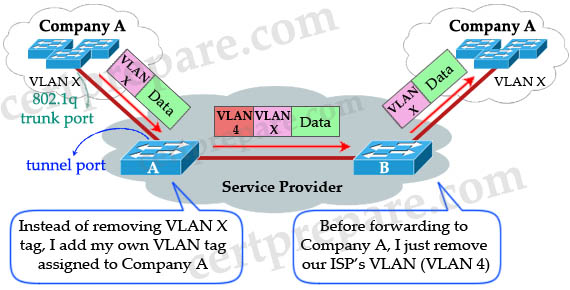
When Switch A (of the Service Provider) receives customer traffic from an 802.1Q trunk port, it does not strip the received 802.1Q tag from the frame header; instead, the tunnel port leaves the 802.1Q tag intact, adds a 1-byte Ethertype field (0x8100) and a 1-byte length field and puts the received customer traffic into the VLAN to which the tunnel port is assigned. This Ethertype 0x8100 traffic, with the received 802.1Q tag intact, is called tunnel traffic. Notice that “VLAN X” here can be one or multiple VLANs, all will be tagged with VLAN 4 (suppose VLAN 4 is assigned to Company A).
A benefit of 802.1qQ tunneling is multiple companies can use the overlapped VLANs. For example, Company A can use VLANs 1 to 100 while Company B can use VLANs 50 to 100 (overlapped from VLANs 50 to 100). The ISP’s switches can still classify them because they are attached to different outer VLAN tags. In the example above Company A is assigned to VLAN 4 so we can assign Company B to VLAN 5, Company C to VLAN 6 and so on.
The link between the 802.1Q trunk port on a customer device and the tunnel port is called an asymmetrical link because one end is configured as an 802.1Q trunk port and the other end is configured as a tunnel port.
Note: By default, the native VLAN traffic of a dot1q trunk is sent untagged, which cannot be double-tagged in the service provider network. Because of this situation, the native VLAN traffic might not be tunneled correctly. Be sure that the native VLAN traffic is always sent tagged in an asymmetrical link. To tag the native VLAN egress traffic and drop all untagged ingress traffic, enter the global vlan dot1q tag native command.
(Reference: http://www.cisco.com/en/US/docs/switches/lan/catalyst6500/ios/12.2SX/configuration/guide/dot1qtnl.html)
Question 6
Static VLANs are being used on the Company network. What is true about static VLANs?
A. Devices use DHCP to request their VLAN.
B. Attached devices are unaware of any VLANs.
C. Devices are assigned to VLANs based on their MAC addresses,
D. Devices are in the same VLAN regardless of which port they attach to.
Answer: B
Explanation
The VLAN tags are only added/removed at the switches. Attached devices are unaware of the existence of VLAN in the network.
Question 7
The Company LAN switches are being configured to support the use of Dynamic VLANs. What should be considered when implementing a dynamic VLAN solution? (Choose two)
A. Each switch port is assigned to a specific VLAN.
B. Dynamic VLANs require a VLAN Membership Policy Server.
C. Devices are in the same VLAN regardless of which port they attach to.
D. Dynamic VLAN assignments are made through the command line interface.
Answer: B C
Explanation
Dynamic VLANs provide membership based on the MAC address of an end-user device. When a device is connected to a switch port, the switch must, in effect, query a database to establish VLAN membership. A network administrator also must assign the user’s MAC address to a VLAN in the database of a VLAN Membership Policy Server (VMPS) -> B is correct.
When the link comes up, the switch does not forward traffic to or from this port until the port is assigned to a VLAN. The source MAC address from the first packet of a new host on the dynamic port is sent to the VMPS, which attempts to match the MAC address to a VLAN in the VMPS database. If there is a match, the VMPS sends the VLAN number for that port. If there is no match, the VMPS either denies the request or shuts down the port (depending on the VMPS secure mode setting) -> Devices are in the same VLAN regardless of which port they attach to -> C is correct.
Question 8
The Company LAN is becoming saturated with broadcasts and multicast traffic. What could you do to help a network with many multicasts and broadcasts?
A. Creating smaller broadcast domains by implementing VLANs.
B. Separate nodes into different hubs.
C. Creating larger broadcast domains by implementing VLANs.
D. Separate nodes into different switches.
E. All of the above.
Answer: A
Explanation
By default, switches flood multicasts out all ports (same as broadcasts). However, many switches and routers can be configured to support multicast traffic, and that support is based on the network addresses uses by multicasts. By implementing VLANs, broadcasts and multicast traffic are only sent to ports in the same VLAN of the sending device.
Question 9
You have just created a new VLAN on your network. What is one step that you should include in your VLAN based implementation and verification plan?
A. Verify that different native VLANs exist between two switches for security purposes,
B. Verify that the VLAN was added on all switches with the use of the show vlan command.
C. Verify that the switch is configured to allow for trunking on the switch ports,
D. Verify that each switch port has the correct IP address space assigned to it for the new VLAN.
Answer: B
Explanation
Different native VLANs will cause error messages about the mismatch, and the potential exists that traffic will not pass correctly between the two native VLANs (although a trunk can be brought up with different native VLANs on each end) -> A is not correct.
Answer C is reasonable but it should be done after configuring trunking, not creating a new VLAN -> C is not correct.
A layer 2 switch only needs one IP address for management purpose -> D is not correct.
Answer B is the best choice to verify if our new VLAN was created, and which ports are associated with it.
Question 10
You have configured a Cisco Catalyst switch to perform Layer 3 routing via an SVI and have assigned that interface to VLAN 20. To check the status of the SVI, you issue the show interfaces vlan 20 command at the CLI prompt. You see from the output display that the interface is in an “up/up” state. What must be true in an SVI configuration to bring the VLAN and line protocol up?
A. The port must be physically connected to another Layer 3 device.
B. At least one port in VLAN 20 must be active.
C. The Layer 3 routing protocol must be operational and receiving routing updates from neighboring peer devices.
D. Because this is a virtual interface, the operational status will always be in an “up/up” state.
Answer: B
Explanation
To be “up/up,” a router VLAN interface must fulfill the following general conditions:
* The VLAN exists and is “active” on the VLAN database of the switch.
* The VLAN interface exists on the router and is not administratively down.
* At least one Layer 2 (access port or trunk) port exists, has a link “up” on this VLAN and is in spanning-tree forwarding state on the VLAN.
(Reference: http://www.cisco.com/en/US/docs/switches/lan/catalyst4500/12.2/37sg/configuration/guides/l3_int.html)
Let’s see an example of configuring Switch Virtual Interface (SVI) to perform interVLAN routing between PC0 & PC1:
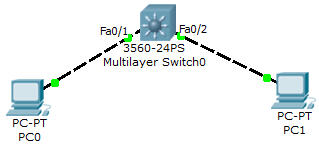
Configuration
//Create two VLANs
L3Switch(config)#vlan 10
L3Switch(config-vlan)#vlan 20
L3Switch(config-vlan)#exit
L3Switch(config)#interface fa0/1
L3Switch(config-if)#switchport mode access
L3Switch(config-if)#switchport access vlan 10
L3Switch(config)#interface fa0/2
L3Switch(config-if)#switchport mode access
L3Switch(config-if)#switchport access vlan 20
L3Switch(config-if)#exit
//Enable IP routing on this Layer 3 Switch
L3Switch(config)#ip routing
//Create two SVIs for interVLAN routing:
L3Switch(config)#interface vlan 10
L3Switch(config-if)#ip address 10.0.0.1 255.255.255.0
L3Switch(config)#interface vlan 20
L3Switch(config-if)#ip address 20.0.0.1 255.255.255.0
On PC0, assign the IP address 10.0.0.2 255.255.255.0 and the default gateway: 10.0.0.1
On PC1, assign the IP address 20.0.0.2 255.255.255.0 and the default gateway: 20.0.0.1
Now we can ping from PC0 to PC1:
PC0>ping 20.0.0.2
Pinging 20.0.0.2 with 32 bytes of data:
Reply from 20.0.0.2: bytes=32 time=40ms TTL=127
Reply from 20.0.0.2: bytes=32 time=40ms TTL=127
Reply from 20.0.0.2: bytes=32 time=40ms TTL=127
Reply from 20.0.0.2: bytes=32 time=40ms TTL=127