Home > MLS and EIGRP Sim

MLS and EIGRP Sim

March 20th, 2011 in LabSim Go to comments

(Updated from real SWITCH Exam on 08-August-2010)

Notice: This is just a sketch about this sim. I can not guarantee the information posted below is correct. So if you know anything new about this sim please post here. Your ideas and comments are warmly welcome!

Question:

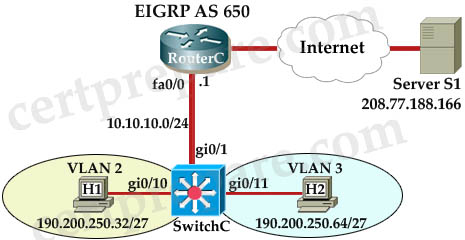
I am still not sure about the question but we need to configure the Multilayer Switch so that PCs from VLAN 2 and VLAN 3 can communicate with the Server.

MLS_EIGRP_Sim.jpg

Answer and Explanation

the config (commented by a certprepare.com’s reader but he does not leave his name, but please say thank to him!)

mls>enable
mls# configure terminal
mls(config)# int gi0/1
mls(config-if)#no switchport -> not sure about this command line, but you should use this command if the simulator does not let you assign IP address on Gi0/1 interface.
mls(config-if)# ip address 10.10.10.2 255.255.255.0
mls(config-if)# no shutdown
mls(config-if)# exit
mls(config)# int vlan 2
mls(config-if)# ip address 190.200.250.33 255.255.255.224
mls(config-if)# no shutdown
mls(config-if)# int vlan 3
mls(config-if)# ip address 190.200.250.65 255.255.255.224
mls(config-if)# no shutdown
mls(config-if)#exit
mls(config)# ip routing (Notice: MLS will not work without this command)
mls(config)# router eigrp 650
mls(config-router)# network 10.10.10.0 0.0.0.255
mls(config-router)# network 190.200.250.32 0.0.0.31
mls(config-router)# network 190.200.250.64 0.0.0.31

NOTE : THE ROUTER IS CORRECTLY CONFIGURED, so you will not miss within it in the exam , also don’t modify/delete any port just do the above configuration.

in order to complete the lab , you should expect the ping to SERVER to succeed from the MLS , and from the PCs as well.

If the above configuration does not work, you should configure EIGRP with “no auto-summary” command:
no auto-summary


Other lab-sims in this site:

LACP with STP Sim
VTP Lab 2
VTP Lab
Spanning Tree Lab Sim
AAAdot1x Lab Sim

Comments
Comment pages
1 2 3 50
  1. Anonymous
    May 24th, 2011

    hey thanks for this and for all comments. Great discussion

    anyone can tip me where I can get hold of latest P4S releases?
    clyne.cyone@gmail.com

    Would Be Much Appreciated.

  2. neshoa
    May 29th, 2011

    guys would you be so kind sending me the right dump files for the exam on neshoa@abv.bg
    I have non of them. plssssss
    thanks in advance

  3. EMEX
    May 31st, 2011

    guys plz send me the right dumps..ceogbu@yahoo.com

  4. boser_soho
    June 5th, 2011

    I think ” no auto-summary” command is not required in this lab.

    EIGRP will summarize subnets across discontiguous network. So 190.200.250.32/27 and 190.200.250.64/27 will be summarized as 190.200.0.0/16 because of 10.0.0.0/8 network in the middle. As long as SERVER doesnot fall in 192.200.0.0/16 range, pings should go fine coz there is no one else who owns that Class B network. Traffic will be segregated at the switch according to directly connected networks in the routing table.

  5. Imran
    June 11th, 2011
  6. pp
    June 17th, 2011

    i am looking for all the tips – what is the server ip addresses to ping.

  7. Mike
    June 18th, 2011

    In the real exam SW didn’t get any routes from RTR (even no adjacency with RTR has been established – cdp looks fine). Command “no auto-summary” isn’t permitted.
    No statics and default routes can be used – ONLY eigrp.

    Thanks certprepare for all stuff.
    This is the right place to visit before taking exam.

  8. samba
    June 18th, 2011

    Dexter cmd is 100% true…I gave the exam today..but couldnt make it..I score 770…same topology..AS number is 650101..i could ping it…thanx to all for your feedback…

  9. r2g
    June 21st, 2011

    took exam today and i didnt pass.
    wat does it mean when it says use lowest ip address in the subnet given?
    thanks

  10. ahmad
    June 21st, 2011

    i think u need to create vlans as well by the command
    (config)#vlan (no)

  11. ahmad
    June 21st, 2011

    @r2g it means to use the first “available” IP address in a given subnet

  12. fschris
    June 24th, 2011

    I could never ping server?!?!?

  13. Anonymous
    June 26th, 2011

    You need to add the following statements:

    vlan 2
    int gi0/10
    switchport access vlan 2

    vlan 3
    int gi0/11
    switchport access vlan 3

    otherwise the switch doesn’t know that gi0/10 belong to vlan 2 and gi0/11 belong to vlan 3

  14. Anonymous
    June 26th, 2011

    x r2g

    In a subnet 190.200.250.32 /27 the ip addresses go from

    190.200.250.33 to
    190.200.250.62

    190.200.250.32 is the network address
    190.200.250.63 is the broadcast address
    190.200.250.64 is the network address of the next network

    so if the hosts can have address from .33 to .62 the LOWEST IP ADDRESS in the subnet given is the .33 …………..so you must use .33 as address for your interface.

  15. Anonymous
    July 4th, 2011

    Hi Can anybody send latest CCNP Switching dump.Kindly send to duraisiv@gmail.com

  16. Lettie
    July 6th, 2011

    That’s raelly shrewd! Good to see the logic set out so well.

  17. Bryan
    July 7th, 2011

    This sim question is come out in my exam, but just only the AS no. different. 100% correct for the answer giving here.

  18. Mohammed
    July 7th, 2011

    I passed the CCNP SWITCH Exam seond time round yesterday, i got 835,
    I got MLS and EIGRP Sim, LACP with STP Sim, AAAdot1x Lab Sim

    I got the same 3labs in both of the SWITCH exam

  19. Mohammed
    July 7th, 2011

    everything in this lab is same, only thing is differnet the ip addresses and eigrp number

    gi 0/1 172.16.x.2 255.255.255.0

    VLAN 2 192.168.3.32
    VLAN 3 192.168.2.64

  20. Mohammed
    July 7th, 2011

    and EIPRP 65010

  21. Lainey
    July 7th, 2011

    Heck of a job there, it asboluetly helps me out.

  22. Geraldine
    July 9th, 2011

    Now that’s sbtule! Great to hear from you.

  23. VAIO
    July 11th, 2011
  24. Geetha
    July 13th, 2011

    Hi friends,
    Jst cleard my Switch paper,got 792—luckily crossed the border.
    Same three labs MLS&EIGRP,AAAdot1X,LACP & HSRP Hotspot.
    While writing the exam itself i felt like i lost the exam, for 2 labs got 100% for other one is 67%.
    drag and drops are a bit tough.I prepared only 3 days for this –that is the main drawback.
    Anyways thanks for the guys who is helping in simulation part.

  25. Max
    July 15th, 2011

    On the real exam are ports gi0/10 and gi0/11 already assigned to the correct vlans? Thanks.

  26. Sinade
    July 19th, 2011

    Thanks to guys at Certprepare for your considerable efforts in my success.

    I wrote CCNP Switch on 15th July and passed with a score of 967.

    Materials used:
    1. Cisco Press – CCNP SWITCH 642-813 Official Certification Guide(2010)
    2. CBT.Nuggets.Cisco.642-813.CCNP.SWITCH.DVD-iNKiSO
    3. SWITCH 642-813 Pass4sure v6.8 497Q
    4. http://www.certprepare.com

    Please read all the P4S and focus on multiple sections (228 Qs). 90% of the questions are from there.

    I have now renewed my CCNP. I hope to have a look at ROUTE and TSHOOT for the new syllabus.

    I wish you guys best of luck.

  27. Vick
    July 19th, 2011

    I passed the exam today, This sim was in, Best way to find out the IP address of Vlan interface is use this command on each host

    c:\ipconfig

    note down default gateway / subnet and use that address for vlan int

    interface vlan 10
    ip address x.x.x.x y.y.y.y
    no shut

  28. dotty
    July 21st, 2011

    Why is it necessary to configure EIGRP on the switch? Couldn’t you just set a default route using ip route 0.0.0.0 0.0.0.0 gi 0/1

  29. dotty
    July 21st, 2011

    nvm…eigrp is need to advertise the 190.200.250 network to the router.

  30. Khattak
    July 31st, 2011

    Passed today with 901. Thanks to all for sharing useful information on this site. Information related to overall exam is posted under “Share your SWITCH Experience”.

    This simulation appeared in my exam.
    >> Server IP was written in Topology (208.77.188.166)
    >> Eigrp AS was “65010”
    >> Subnets used were
    172.16.1.0/24
    192.168.1.32/27 (VLAN2)
    192.168.1.64/27 (VLAN3)
    >> Have to use of lowest host on a subnet when possible. VLAN2 and VLAN3 IP addresses can be taken by running ‘ipconfig /all’ on each host.

    ******************************
    SWITCHC(config)# int gi0/1
    SWITCHC(config-if)#no switchport
    SWITCHC(config-if)#ip address 172.16.1.2 255.255.255.0 >> (.1) was mentioned in the topology on Router port connected to Switch. So next lowest IP was (.2).

    SWITCHC(config-if)#no shutdown
    SWITCHC(config-if)#exit

    SWITCHC(config)# int vlan 2
    SWITCHC(config-if)# ip address 192.168.1.33 255.255.255.224
    SWITCHC(config-if)# no shutdown
    SWITCHC(config-if)#exit

    SWITCHC(config-if)# int vlan 3
    SWITCHC(config-if)# ip address 192.168.1.65 255.255.255.224
    SWITCHC(config-if)# no shutdown
    SWITCHC(config-if)#exit

    SWITCHC(config)# ip routing
    SWITCHC(config)#router eigrp 65010
    SWITCHC(config-router)#network 172.16.1.0 0.0.0.255
    SWITCHC(config-router)#network 192.168.1.32 0.0.0.31
    SWITCHC(config-router)#network 192.168.1.64 0.0.0.31

    SWITCHC #copy run start

    SWITCHC#ping 208.77.188.166
    !!!!!
    Also ping 208.77.188.166 from each host.

  31. Sero
    August 7th, 2011

    I passed the switch exam yesterday, this sim lab is there only the AS No. change and the ip address, thanks to this forum

  32. Ratan
    August 7th, 2011

    An alternate way of doing this,

    PC1 – 190.200.250.66 255.255.255.224 gateway – 190.200.250.65
    PC0 – 190.200.250.34 255.255.255.224 gateway – 190.200.250.33
    Server IP – 172.16.1.2 255.255.255.0 Gateway – 172.16.1.1

    Switch Configuration

    Switch#sh run
    Building configuration…

    Current configuration : 1275 bytes
    !
    version 12.2
    no service timestamps log datetime msec
    no service timestamps debug datetime msec
    no service password-encryption
    !
    hostname Switch
    !
    !
    !
    !
    !
    ip routing
    !
    !
    !
    !
    !
    !
    !
    !
    ip name-server 0.0.0.0
    !
    !
    !
    !
    !
    !
    interface FastEthernet0/1
    switchport access vlan 2
    switchport mode access
    !
    interface FastEthernet0/2
    switchport access vlan 3
    switchport mode access
    !
    interface FastEthernet0/3
    switchport trunk allowed vlan 2-3
    switchport trunk encapsulation dot1q
    switchport mode trunk
    !
    interface FastEthernet0/4
    !
    interface FastEthernet0/5
    !
    interface FastEthernet0/6
    !
    interface FastEthernet0/7
    !
    interface FastEthernet0/8
    !
    interface FastEthernet0/9
    !
    interface FastEthernet0/10
    !
    interface FastEthernet0/11
    !
    interface FastEthernet0/12
    !
    interface FastEthernet0/13
    !
    interface FastEthernet0/14
    !
    interface FastEthernet0/15
    !
    interface FastEthernet0/16
    !
    interface FastEthernet0/17
    !
    interface FastEthernet0/18
    !
    interface FastEthernet0/19
    !
    interface FastEthernet0/20
    !
    interface FastEthernet0/21
    !
    interface FastEthernet0/22
    !
    interface FastEthernet0/23
    !
    interface FastEthernet0/24
    !
    interface GigabitEthernet0/1
    !
    interface GigabitEthernet0/2
    !
    interface Vlan1
    no ip address
    shutdown
    !
    ip classless
    !
    !
    !
    !
    !
    !
    !
    line con 0
    line vty 0 4
    login
    !
    !
    !
    end

    Switch#
    Switch#

    Router Configuration,

    Router#sh run
    Building configuration…

    Current configuration : 1970 bytes
    !
    version 12.4
    no service timestamps log datetime msec
    no service timestamps debug datetime msec
    no service password-encryption
    !
    hostname Router
    !
    !
    !
    !
    !
    !
    !
    !
    !
    !
    !
    !
    !
    !
    !
    !
    !
    !
    interface Loopback0
    no ip address
    !
    interface FastEthernet0/0
    ip address 10.10.10.1 255.255.255.0
    duplex auto
    speed auto
    !
    interface FastEthernet0/0.1
    encapsulation dot1Q 2
    ip address 190.200.250.33 255.255.255.224
    !
    interface FastEthernet0/0.2
    encapsulation dot1Q 3
    ip address 190.200.250.65 255.255.255.224
    !
    interface FastEthernet0/1
    ip address 172.16.1.1 255.255.255.0
    duplex auto
    speed auto
    !
    interface Serial0/0/0
    no ip address
    shutdown
    !
    interface Serial0/0/1
    no ip address
    shutdown
    !
    interface Serial0/1/0
    no ip address
    shutdown
    !
    interface Serial0/1/1
    no ip address
    shutdown
    !
    interface FastEthernet1/0
    switchport mode access
    shutdown
    !
    interface FastEthernet1/1
    switchport mode access
    shutdown
    !
    interface FastEthernet1/2
    switchport mode access
    shutdown
    !
    interface FastEthernet1/3
    switchport mode access
    shutdown
    !
    interface FastEthernet1/4
    switchport mode access
    shutdown
    !
    interface FastEthernet1/5
    switchport mode access
    shutdown
    !
    interface FastEthernet1/6
    switchport mode access
    shutdown
    !
    interface FastEthernet1/7
    switchport mode access
    shutdown
    !
    interface FastEthernet1/8
    switchport mode access
    shutdown
    !
    interface FastEthernet1/9
    switchport mode access
    shutdown
    !
    interface FastEthernet1/10
    switchport mode access
    shutdown
    !
    interface FastEthernet1/11
    switchport mode access
    shutdown
    !
    interface FastEthernet1/12
    switchport mode access
    shutdown
    !
    interface FastEthernet1/13
    switchport mode access
    shutdown
    !
    interface FastEthernet1/14
    switchport mode access
    shutdown
    !
    interface FastEthernet1/15
    switchport mode access
    shutdown
    !
    interface Vlan1
    no ip address
    shutdown
    !
    router eigrp 65
    network 10.0.0.0
    network 172.16.0.0
    no auto-summary
    !
    ip classless
    !
    !
    !
    !
    !
    !
    !
    line con 0
    line vty 0 4
    login
    !
    !
    !
    end

    Router#

  33. Anonymous
    August 8th, 2011

    Could someone please send latest P4S dumps mandar1607@gmail.com

  34. EddySan
    August 10th, 2011

    Hi Ratan,

    I am pretty sure since your using a layer 3 switch instead of a router you wouldn’t be able to create sub-interfaces hence why it’s done the other way.

  35. Ratan
    August 10th, 2011

    Hi EddySan,

    I am also very much sure that it has no dependency upon if we are using L3 or L2 switch I can always create sub-interfaces on a router. Off course the original solution will be a faster one with SVI created and routed also using router interface for negotiating trunks can also create bottleneck, however I just advised an alternate way of doing it not the fast way of doing it.

  36. EddySan
    August 11th, 2011

    All good Ratan :) I just have a layer 3 switch here and i tried to create sub-interfaces and no joy after a google search it seems its the way they are made since it’s not a router :) Since we are configurating the layer 3 switch and not the router i don’t know if your long solution works…..

    But if you figure out a way to create sub interfaces on a layer 3 switch let me know it might be my IOS holding be back.

  37. Ratan
    August 11th, 2011

    I have yet not taken SWITCH hence not sure if we have access to that router or not in the exam. Also even after disabling switchport features on a port of L3 switch does not cater sub-internet option. Not sure if it is at all possible or dependent on IOS version. Will update you soon.

  38. pradip thakare[shahapur]
    August 12th, 2011

    whats the series of switch is it 3560 or 3600 @EDDYSan its supported post 12.2 ios , so plz let me know the series

  39. Allwyn_Dcosta
    August 13th, 2011

    I took the switch exam today and scored 988…………

    Thank You Certprepare !!!!!!!!!!!!!!!

    I got the -
    1.LACP with STP Sim
    2.AAAdot1x Lab Sim
    3.EIGRP MLs sim

    I used the same configs as provided by certprepare….
    For the remailning questions each and every question were asked from Pass4sure v.68.

  40. CR-SW
    August 13th, 2011

    I took the test but it seems like they have made some changes since I have a HSRP lab with 6 questions.
    I was wondering if any one has the latest P4S since I failed the test and I really need to pass it, I have been studying but I feel kind of nervous.
    I really appreciate it

  41. Anonymous
    August 14th, 2011

    @CR-SW Use the Pass4sure v.68 dumps…..refer to the hotspots given over here.

  42. EddySan
    August 16th, 2011

    Hey peeps,

    I passed Ratan it’s pretty easy if you have the knowledge and study these labs goodluck mate :)

  43. Saturday is the day….
    August 19th, 2011

    Writing exam Saturday!!!!!!!!!!!!!!!!!!! ended up taking Tshoot last weekend on short notice since I didn’t feel ready for Switch. passed Tshoot, so all I have left is Switch. Hopefully will be CCNP this weekend. Thanks certprepare!!

  44. joe mathew
    August 22nd, 2011

    does the following commands have to be included in the configuration

    vlan 2
    int gi0/10
    switchport access vlan 2
    vlan 3
    int gi0/11
    switchport access vlan 3

    kindly respond anyone

  45. Tuhaise
    August 22nd, 2011

    Pliz help with the latest dumps…..tuhaiserobert@yahoo.com

  46. naveen
    August 22nd, 2011

    follow the below :

    1 hot spot :
    it can be either 1 of the below 2 links, mostly hsrp only (6 questions-90 per chance of coming)
    1) http://www.certprepare.com/hsrp-hotspot
    2)http://www.certprepare.com/stp-hotspot

    drag and drops are 16 out of this 5-6 will come look everything, but few told major will be this below link, still be perfect on all the 16 drag and drops :

    http://www.certprepare.com/drag-and-drop-questions

    plus check the 3rd comment u can see 2 more drag and drops also…

    all the drag and drops are here :
    http://wenku.baidu.com/view/dac1ee53f01dc281e53af01e.html

    labs:
    1)http://www.certprepare.com/lacp-with-stp-sim#more-52
    2)http://www.certprepare.com/aaadot1x-lab-sim#more-41
    3)http://www.certprepare.com/mls-and-eigrp-sim#more-50

  47. Ranganathan
    August 22nd, 2011

    Could some one clarify how to login into the Multilayer switch.. I dont see where the console connection is ??

  48. Anonymous
    August 23rd, 2011

    Good News !!!
    I have a updated dump contact me for it
    kellysmith114@gmail.com

  49. joe mathew
    August 23rd, 2011

    hey ranganathan

    i just clicked on the switch in the topology and i got the console . i dont see any other way. i you find anything let me know . Best Of Luck.

  50. xtremzores
    September 2nd, 2011

    @anonymous, pls post here if possible or xtremzores@gmail.com :) thanks…. pls help thanks a lot!

  51. Imran
    September 6th, 2011

    learn this lab in GNS3 with VMware at
    http://www.youtube.com/watch?v=acxHH8asIa8
    Thanks

  52. Kutty
    September 6th, 2011

    Hi All, Pl share latest dumps in this post.

  53. hi
    September 7th, 2011

    Hello I need your help and your advice I entered the exam and got the 781 class of 1000 do not know where the problem
    But what happened with me is a matter of copy running-config startup-config
    Not pleased to work save
    In questions lacp, aaadot1x
    Possible, help me please reply quickly because I would like to enter the exam next Saturday
    Thank you

  54. praxis
    September 8th, 2011

    Just cleared the 642-813 exam today. 912/1000. This saved my CCNA and CCIP and now working towards CCNP TSHOOT.
    - doing the MLS+EIGRP lab, the java.exe crapped out and I had to restart the testing software, luckily when it restarted, it went back to the start of the MLS+EIGRP lab again, all previous questions was save.. didnt have to totally start back with question #1. This was question #7 for me.
    - in this LACP with STP Sim, it asked me to config SW-B (left switch) to match the vtp mode (transparent) and stp mode (rstp) of SW-A (right switch)
    - all the VAIO dnd’s were accurate
    - used P4S 479Q and vce version.
    - used CBTNuggets, Cisco Video Mentor
    - read the CiscoPress Hucaby book, The CiscoPress Froom book

    Thanks CertPrepare for all the good stuff on here. It really helped alot!

  55. francis
    September 9th, 2011

    On the labs were the saving commands working. Were the labs behaving well for you. Whats must be done if the lab hangs on you before you finish doing it

    Was time to complete exam more than enough for you. Is it ossible to go back and review all the exam questions if you finish earlier without reseting the previous answers

    Any questions from voice and wireless

  56. Leo
    September 9th, 2011

    I passed My Exam – 945.

    The Lab in here is still valid. Just the ip addresses has change.

  57. Attal
    September 10th, 2011

    Just passed the exam today, got this lab.
    The swithchport command was available so I used for the router interface and hence I only created the two VLANs in the diagram.

  58. Oleg
    September 27th, 2011

    Nice one shaun

  59. Rohit
    October 17th, 2011

    EIGRP

    Switch C
    int gi 0/1

    no switchport

    ip address 172.16.1.2 255.255.255.0
    no shut
    exit

    int vlan 2
    ip address 192.168.3.33 255.255.255.224
    no shut

    int vlan 3
    ip address 192.168.3.65 255.255.255.224
    no shut

    ip routing

    router eigrp 65010
    network 172.16.1.0 0.0.0.255
    network 192.168.3.32 0.0.0.31
    network 192.168.3.64 0.0.0.31
    end
    copy run start

  60. wizzla
    November 4th, 2011

    i got this lab in my exam…after entering the above configuration, i was unable to ping the server for some reason that i don’t know…i wasted a lot of time trying to ‘fix’ the issued but i gave up at some point leaving the config as above…i scored 912 so i’m guessing something was wrong with the simulator…..

  61. Sanjith
    November 11th, 2011

    Hi guys,
    i cleared SWITCH today, scored 965… This question was asked. Please go through the config which Mr. Rohit updated as on 17th October, thats the real thing which u need to do ..

  62. Gardener
    November 19th, 2011

    It’s great the comments of All.

    But what is missing on the config of Mr. Rohit is

    The Physical Interface that looks the PCs,

    Based on the lab sim of this topic

    Inter fas0/2
    switchport access vlan 2

    Inter fas0/3
    switchport access vlan 3

    Regards
    Gardener

  63. abs203
    November 19th, 2011

    Switch#sh running-config
    Building configuration…

    Current configuration : 1526 bytes
    !
    version 12.2
    no service timestamps log datetime msec
    no service timestamps debug datetime msec
    no service password-encryption
    !
    hostname Switch
    !
    !
    !
    !
    !
    ip routing
    !
    !

    !
    !
    interface GigabitEthernet0/10
    switchport access vlan 2
    switchport mode access
    !
    interface GigabitEthernet0/11
    switchport access vlan 3
    switchport mode access
    !
    interface GigabitEthernet0/1
    no switchport
    ip address 10.10.10.2 255.255.255.0
    duplex auto
    speed auto
    !

    !
    interface Vlan1
    no ip address
    shutdown
    !
    interface Vlan2
    ip address 190.200.250.33 255.255.255.224
    !
    interface Vlan3
    ip address 190.200.250.65 255.255.255.224
    !
    router eigrp 650
    network 10.10.10.0 0.0.0.255
    network 190.200.250.32 0.0.0.31
    network 190.200.250.64 0.0.0.31
    auto-summary
    !
    ip classless
    !
    !
    !
    !
    !
    !
    !
    line con 0
    line vty 0 4
    login
    !
    !
    !
    end

    Switch#

    Switch#ping 172.16.1.2 ping 172.16.1.2

    Pinging 172.16.1.2 with 32 bytes of data:

    Reply from 172.16.1.2: bytes=32 time=14ms TTL=126
    Reply from 172.16.1.2: bytes=32 time=6ms TTL=126
    Reply from 172.16.1.2: bytes=32 time=8ms TTL=126
    Reply from 172.16.1.2: bytes=32 time=15ms TTL=126

    Ping statistics for 172.16.1.2:
    Packets: Sent = 4, Received = 4, Lost = 0 (0% loss),
    Approximate round trip times in milli-seconds:
    Minimum = 6ms, Maximum = 15ms, Average = 10ms

    PC>

    —-

    PC>ipconfig

    IP Address………………….: 190.200.250.34
    Subnet Mask…………………: 255.255.255.224
    Default Gateway……………..: 190.200.250.33

    PC>

  64. abs203
    November 19th, 2011

    I configured this lab on Packet Tracer. Was able to ping the Server from the PC. Believe this is correct please correct if I’m not.. Thanks everyone this forum has been much valuable.

  65. bangz
    November 21st, 2011

    now some one tell me what are the actual requirements that the labs demand, i mean what is the real questions

  66. Kelvin Jr
    November 21st, 2011

    please noble house am about to write my switch exam , please help a worried boy with the latest dumps.. God will bless you.

  67. Kelvin Jr
    November 21st, 2011

    please help a worried boy with the latest dumps, cant afford to buy it.. am writing my exam very soon. God bless.. my email is talkwithemmy@gmail.com

  68. ccnp-hopeful
    November 25th, 2011

    FYI: This lab is completely doable in GNS3. connect the PC’s and or the Server to the switch/router with either QEMU guests, or other routers. Set the interfaces to the proper addressing. However, you do have to know how to setup “router on a stick” for the Main router.. but heck, if your taking SWITCH, you already know how to do that ( from CCNA).

  69. ccnp-hopeful
    November 25th, 2011

    Let me edit my previous comment.. you wouldnt want to do “router on a stick” because that completely defeats the purpose of MLS design. However, still completely doable in GNS3.. more setup, but if you dont have the equipment.. you cant beat it..

  70. JID
    December 1st, 2011

    please help me with the latest dumps, cant afford to buy it.. am writing my exam very soon. God bless.. my email is jideedu@gmail.com

  71. Anonymous
    December 2nd, 2011

    please help me with the latest dumps , my email is sriramm123@gmail.com .
    Thanks for ur help in advance

  72. Goal
    December 6th, 2011

    pls assist me
    ======================
    I cant ping server from mls, server ip is 172.16.1.2
    this is my config pls correct:
    interface FastEthernet0/3
    no switchport
    ip address 10.10.10.2 255.255.255.0
    duplex auto
    speed auto
    !
    interface FastEthernet0/4
    !
    interface FastEthernet0/5
    !
    interface FastEthernet0/6
    !
    interface FastEthernet0/7
    !
    interface FastEthernet0/8
    !
    interface FastEthernet0/9
    !
    interface FastEthernet0/10
    !
    interface FastEthernet0/11
    !
    interface FastEthernet0/12
    !
    interface FastEthernet0/13
    !
    interface FastEthernet0/14
    !
    interface FastEthernet0/15
    !
    interface FastEthernet0/16
    !
    interface FastEthernet0/17
    !
    interface FastEthernet0/18
    !
    interface FastEthernet0/19
    !
    interface FastEthernet0/20
    !
    interface FastEthernet0/21
    !
    interface FastEthernet0/22
    !
    interface FastEthernet0/23
    !
    interface FastEthernet0/24
    !
    interface GigabitEthernet0/1
    !
    interface GigabitEthernet0/2
    !
    interface Port-channel 1
    switchport trunk encapsulation dot1q
    switchport mode trunk
    !
    interface Vlan1
    no ip address
    shutdown
    !
    interface Vlan2
    ip address 190.200.250.33 255.255.255.224
    !
    interface Vlan3
    ip address 190.200.250.65 255.255.255.224
    !
    router eigrp 650
    network 10.10.10.0 0.0.0.255
    network 190.200.250.32 0.0.0.31
    network 190.200.250.64 0.0.0.31
    no auto-summary
    !
    ip classless

  73. burak
    December 7th, 2011

    do not forget to add this commands on mls interfaces to be able ping server from each host.

    write these commands on mls:
    int gi0/1
    switchport mode access
    switcport acccess vlan 2

    int gi0/2
    switportt mode access
    switchport access vlan3

    otherwise you can not ping server and router interfaces.

  74. spy
    December 7th, 2011

    2-day i passed switch exam got 912 marks….this lab is present in my exam…

    i have solved all 3 lab correctly…..but mess up in simple Multiple choice Question…anyway….

    if u wann any information regarding this switch exam then contact me on tokle.sumit@gmail.com..i will give your all problem answer…as i remember every thing

  75. Anonymous
    December 8th, 2011

    Passed with 923

  76. HIO
    December 9th, 2011

    passed,this lab still valid!!! all the best

  77. Ritzenheim
    December 12th, 2011

    Why is it a network 190.200.250.64 0.0.0.31 why not 0.0.0.32

  78. Ritzenheim
    December 12th, 2011

    lol sorry did my math wrong

  79. baraka
    December 12th, 2011

    Folks, I am horribly puzzled..

    after creating a SVI interfaces they are down as long as there is no switch port associated with the vlan. And according to the objective we should not change any port assignments!
    how do we making it working with vlan interfaces down? :(

  80. dwlms3
    December 17th, 2011

    I am taking this test next week and trying to prepare. From all the above mentioned can a conclude the following: (Please anyone let me know if mistakes are present)

    mls# conif t
    mls(config)# int gi0/1
    mls(config-f)# no switchport
    mls(config-f)# ip address 10.10.10.2 255.255.255.0
    mls(config-f)# no shut
    mls(config-f)# exit
    mls(config)# int vlan 2
    mls(config-f)# ip address 190.200.250.33 255.255.255.224
    mls(config-f)# no shut
    mls(config-f)# int vlan 3
    mls(config-f)# ip address 190.200.250.65 255.255.255.224
    mls(config-f)# no shut
    mls(config-if)# exit
    mls(config)# int gi0/10
    mls(config-f)# switchport mode access
    mls(config-f)# switchport access vlan 2
    mls(config-f)# no shut
    mls(config-f)# exit
    mls(config)# int gi0/11
    mls(config-f)# switchport mode access
    mls(config-f)# switchport access vlan 3
    mls(config-f)# no shut
    mls(config-f)# exit
    mls(config)# ip routing
    mls(config)# router eigrp
    mls(config-router)# network 10.10.10.0 0.0.0.255
    mls(config-router)# network 190.200.250.32 0.0.0.31
    mls(config-router)# network 190.200.250.64 0.0.0.31
    if ping does not work->
    mls(config-router)# no auto-summary

    mls#ping 208.77.188.166

  81. WASEEM
    December 19th, 2011

    TOMORROW IS MY PPR. LETS SEE WHATS HAPPENS… I AM FULLY ‘PREPARED n ‘CONFIDENT.
    I WILL UPDATE IT LATER…
    Bla Bla Bla… BYE

  82. Vonda32Burris
    December 19th, 2011

    If you want to buy a house, you would have to receive the credit loans. Furthermore, my sister all the time takes a commercial loan, which seems to be the most reliable.

  83. aw311
    December 22nd, 2011

    ASA 650 is a Cisco box so cdp should work if not i will ping 10.10.10.0 and who ever replies is the ip of the ASA.

  84. MB
    December 26th, 2011

    can anyone who did the exam in the past few weeks tell me which did he get in the exam ???

  85. Bharath
    December 26th, 2011

    Hi Guys,

    Couple of hours before I passed my Switching exam, this site was very helpful and thanks a lot for all your contributions. I got 3 simulators (LACP, DOT1X, EIGRP with MLS), 2 drag & drop (syslog order, Sys, N/W, Mgmnt Levels), 1 hot spot (HSRP).

    All optional questions came from the below Dumps, (examcollection)

    Cisco ActualTest 642-813 v2011-11-11 by nonentity 407q.vce

    For Simulators and Drag & Drop use the below dump (Drag & Drop Section)

    Cisco Pass4sure 642-813 v2011-09-20 by WhiteNetworks 459q.vce

    Thanks once again.

  86. Osman
    December 30th, 2011

    @ Mohammed Imran have you made video’s for AAA802.1x and lacp with sim and thanx. I took my exam at September and failed god give me luck this time

  87. Faisal
    January 8th, 2012

    @all
    please tell me from where can i get the sims for practice
    faisal.safdar@live.com

  88. 02bU
    January 9th, 2012

    You have been tasking with configuring multilayer SwitchC,which has a partial configuration and has been attached to RouterC as shown in the topology diagram.

    You need to configure SwitchC so that Hosts H1 and H2 can successfully ping the server S1. Also SwitchC needs to be able to ping server S1.

    Due to administrative restrictions and requirements you should not add/delete vlans or create trunk links.Company policies forbid the use of static or default

    routing.All routes must be learned via EIGRP 65010 routing protocol.
    I found this post. This is the verbage on the test for this simm. Hope this helps

    You do not have access to RouterC;assume that RouterC is correctly configured

    The following subnets are available to implement this solution.Routed interfaces MUST use the lowest available IP address on a subnet.

    172.16.1.0/24, 192.168.3.32/27, 192.168.3.64/27 and 192.168.3.96/27

    Host H1 and H2 are configured with the correct IP address and Defalut Gateway

    SwitchC uses cisco as the enable password.

    The current VLAN configuration on SwitchC should not be deleted or modified.

    Routing must only be enabled for the specific subnet shown in the diagram.

    Note:Due to administrative restrictions and requirements you should not add/delete vlans, change vlan port assignments or create trunk links. Company

    polices forbid the use of static or default routing. All routes must be learned via the eigrp routing protocol.

    [Topology] link for pic of topology same as listed but with different ip addresses

    http://www.ciscobibles.com/wp-content/uploads/2011/02/MLSEIGRPLAB.jpg

    [Solution]

    1. Find the following details from question

    AS no = 65010

    VLAN2 IP = 192.168.3.33 255.255.255.224

    VLAN3 IP = 192.168.3.65 255.255.255.224

    gig 0/1 IP = 172.16.1.1 255.255.255.0

    [It is instructed to use the lowest IP of the given subnets for the routed interfaces and the SVIs]

    Note that we can not do modify any vlan configurations in the switch/PCs. All are configured with the correct names and IPs.

    We need to implement following tasks:
    1.Configure all 3 routed interfaces.
    2.Enable IP routing and configure EIGRP in the switch.

    2. Configurations on MultiLayer Switch [MLS]:

    int gig 0/1

    no switchport

    ip address 172.16.1.1 255.255.255.0

    no shutdown

    int vlan 2

    ip address 192.168.3.33 255.255.255.224

    no shutdown

    int vlan 3

    ip ad dress 192.168.3.65 255.255.255.224

    no shutdown

    ip routing

    router eigrp 65010

    network 192.168.3.32 0.0.0.31

    network 192.168.3.64 0.0.0.31

    network 172.16.1.0 0.0.0.255

    no auto-summary

    copy running-config startup-config

    3. Verification:

    We should be able to ping from MLS to the gateway called “Server S1” [208.77.188.166]

    Note:

    The copy run start is not work in may LABS. It is not an issue for the examination. Just do it.

  89. 02bU
    January 9th, 2012

    Here is the verbage as you will see it on the actual test.
    CCNP SWITCH(642-813) Lab – STP+LACP(New)

    By admin | February 12, 2011

    [Scenario]

    You have been tasked with configuring SwitchB,which has a minimal configuration and has been added to the existing network shown in the topology diagram.

    SwitchA is currently configured correctly.but will need to be modified to support the addition of SwtichB. The VTP and STP configuration modes on SwitchA should not be modified. However SwtichA needs to be the root switch for all vlan instances.

    The two connections between SwitchA and SwitchB need to be configured using a non-proprietary protocol that allows both the lines to be actively forwarding data,with SwtichA controlling activation. Propagation of unnessary broadcasts should be limited using manual pruning on this trunk link.

    For operational and security reasons trunking between SwitchA and SwitchB should uncondition and Vlan1 and other access vlans need to be tagged when traversing the trunk link.

    Requirements for SwitchB
    ■ Vlan RST ID = 21, supports two servers attached to fa0/9 and fa0/10
    ■ Vlan RST ID = 22, supports two servers attached to fa0/13 and fa0/14
    ■ Vlan RST ID = 23, supports two servers attached to fa0/15 and fa0/16
    ■ Access ports supporting servers must transition immediately to forwarding state.
    ■ No routing is to be supported on SwitchB
    ■ Only SVI Vlan 1 is to be configured and it is to use address 192.168.1.11/24
    ■ SwitchA and SwitchB use cisco as the enable password
    ■ Ensure that devices on SwitchB can reach devices behind RouteA

    [Topology]

    to see the pics, click on this link: http://www.ciscobibles.com/archives/3604.html

    [Solution] to see the solution and pics of the network: click on this link

    http://www.ciscobibles.com/archives/3604.html

    1. Verification on the Pre-Configuration:

    Switch A:
    a. Check the Router’s interface IP [192.168.1.10] [Need to set for the default gateway for Switch B]
    b. Checks the Vlans [1, 11-13, 98-99] already created and identify the Native vlan [99] and it’s Name [TrunkNative]
    c. Check the all the interfaces especially Fast Ethernet 0/3 and 0/4 [Because in many of the people report that those interfaces were already assigned to a vlan98, so we need to remove it from that vlan because we later we will be assigning them to trunk port]

    Switch B:
    a. Check the created vlans. [Only vlan1 created]
    b. Check the SVI is assigned to the vlan1 as noted in the question [192.168.1.11/24, most of the times it is assigned in the exam]

    2. Configuration on Switch B: [Configure Vlan/Assign ports/Make the Switch A ROOT for the STP]

    3. Configuration on Switch A: [Configure Vlan/ Verify the ROOT configured]

    4. Configure the Trunk Ports and Finally, Port-Aggregation [LACP]

    5. Varify the configuration :

    On Access Switch B ping 192.168.1.10
    !!!!!

    Note:
    1. The copy run start will not work most of the times, do not worry. Leave it.

    2. int port-channel 1

    switchport trunk native vlan 99
    The above command is not needed most of the times. Use it if you gat any vlan mismatch notification on the screen.

    3. SVI is configured most of the times.

    4. switchport trunk encapsulation dot1Q / This command will not work on the Distribution switch [A]. Assume it is configured on the LAB.

    5. Finally no not try any unwanted/wrong commands on the console. That is not a real switch!

    6. In the packet tracer which I have uploaded, you can configure every thing. But, after 1 minute the Port channel will be down. It is an issue with the Packet Tracer.

    STP+LACP.ptk

  90. Faisal
    January 14th, 2012

    Thanks o2bu

  91. Siddiq – UAE
    January 19th, 2012

    Hi
    I passed my Exam yesterday with score 835
    I had this lab with IP:
    172.16.1.0/24
    192.168.1.32/27 (VLAN2)
    192.168.1.64/27 (VLAN3)
    they said dot create new VLANs or trunk link or Gateway or static route
    and the switch need to ping the server 208.77.188.166 and also the two hosts need to ping this server
    my configuration:

    SW(config)#int gi0/1
    SW(config-if)#no switchport
    SW(config-if)#ip add 172.16.1.2 255.255.255.0
    SW(config-if)#no shutdown

    SW(config)#int vlan 2
    SW(config-if)#ip add 192.168.1.33 255.255.255.224
    SW(config-if)#no shut

    SW(config)#int vlan 3
    SW(config-if)#ip add 192.168.1.65 255.255.255.224
    SW(config-if)#no shutdown

    SW(config)#ip routing
    SW(config)#router eigrp 65010
    SW(config-router)#network 172.16.0.0 0.0.255.255
    SW(config-router)#network 192.168.1.32 0.0.0.31
    SW(config-router)#network 192.168.1.64 0.0.0.31
    ————————-

    the (no auto) is not working in the EIGRP and when I put the network 172.16.1.0 0.0.0.255 I cod not see any neighbor, but when I changed to network 172.16.0.0 0.0.255.255 it work
    and after that I can ping between the hosts and between the switch and hosts and from switch to server.. BUT I cod not ping from hosts to server NEVER !!!!

    so I try to create VLAN 1 they say you can’t created !!

    I don’t know what the problem
    I stay in this lab like one hour to fix the problem but I cod not found any problem in my configuration !!!

    So if any one can tell me the problem?

  92. James
    January 21st, 2012

    Hi All,
    Is there a management Vlan already created in this Lab?
    In ciscobibles.com they mention a third (192.168.3.96/27) network in their senario but haven’t added it to Router EIGRP 65010.
    Can someone clarify?
    Thanks James.

  93. IBANEZBOOGIEKING
    January 24th, 2012

    Under the EIGRP process on the MLS you could also just redistribute the connected interfaces. I find this cleaner and more efficient with less chance of a typo while doing the eigrp config.

  94. Newbie !
    February 4th, 2012

    I feel every is skipping one step from the configuration. ” Switch port access vlan 2/3 ” .
    Except “dwlms3″ no one has mentioned about this statement or is it predefined in the switch ????

  95. Perez
    February 6th, 2012

    Hi i m passed 912

    Thanks Certprepare

Comment pages
1 2 3 50
  1. No trackbacks yet.
Add a Comment