
Home > VTP Lab

VTP Lab

April 16th, 2012 in LabSim Go to comments

Question:

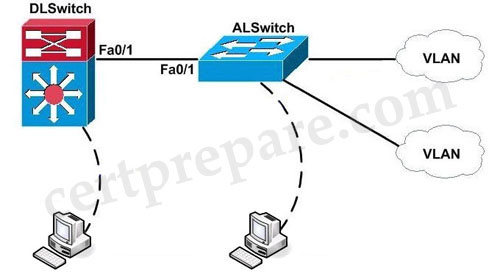
The headquarter offices for a book retailer are enhancing their wiring closets with Layer3 switches. The new distribution-layer switch has been installed and a new access-layer switch cabled to it. Your task is to configure VTP to share VLAN information from the distribution-layer switch to the access-layer devices. Then, it is necessary to configure interVLAN routing on the distribution layer switch to route traffic between the different VLANs that are configured on the access-layer switches; however, it is not necessary for you to make the specific VLAN port assignments on the access-layer switches. Also, because VLAN database mode is being deprecated by Cisco, all VLAN and VTP configurations are to be completed in the global configuration mode. Please reference the following table for the VTP and VLAN information to be configured:
VTP_Lab.jpg

Requirements:

VTP Domain name cisco  
VLAN Ids 20 21
IP Addresses 172.16.71.1/24 172.16.132.1/24

These are your specific tasks:

1. Configure the VTP information with the distribution layer switch as the VTP server
2. Configure the VTP information with the access layer switch as a VTP client
3. Configure VLANs on the distribution layer switch
4. Configure inter-VLAN routing on the distribution layer switch
5. Specific VLAN port assignments will be made as users are added to the access layer switches in the future.
6. All VLANs and VTP configurations are to completed in the global configuration. To configure the switch click on the host icon that is connected to the switch be way of a serial console cable.

Answer and Explanation:


1) Configure the VTP information with the distribution layer switch as the VTP server:


DLSwitch#configure terminal
DLSwitch(config)#vtp mode server
DLSwitch(config)#vtp domain cisco (use cisco, not CISCO because it is case sensitive)

(Requirement 2 will be solved later)
3) Configure VLANs on the distribution layer switch

To create VLANs on a switch, use the vlan vlanID# command:
DLSwitch(config)#vlan 20
DLSwitch(config)#vlan 21

Configure Ip addresses for Vlans:

DLSwitch(config)#interface vlan 20
DLSwitch(if-config)#ip address 172.16.71.1 255.255.255.0
DLSwitch(if-config)#no shutdown
DLSwitch(if-config)#interface vlan 21
DLSwitch(if-config)#ip address 172.16.132.1 255.255.255.0
DLSwitch(if-config)#no shutdown
DLSwitch(if-config)#exit

4) Configure inter-VLAN routing on the distribution layer switch

DLSwitch(config)#ip routing
DLSwitch(config)#exit
DLSwitch#copy running-config startup-config

2) Configure the VTP information with the access layer switch as a VTP client

ALSwitch#configure terminal
ALSwitch(config)#vtp mode client
ALSwitch(config)#vtp domain cisco
ALSwitch(config)#exit

ALSwitch#copy running-config startup-config

(Notice: Many reports said the copy running-config startup-config didn’t work but they still got the full mark)

Other lab-sims in this site:

LACP with STP Sim
MLS and EIGRP Sim
VTP Lab 2
Spanning Tree Lab Sim
AAAdot1x Lab Sim

Comments
Comment pages
1 2 46
  1. Matt
    January 14th, 2013

    Hey would someone mind sending me this the packet tracer file for this lab? Thanks! mattc514@gmail.com

  2. Marco
    January 15th, 2013

    Hey would someone mind sending me this the packet tracer file for this lab? Thanks! marco.massaroni@gmail.com

  3. CORAZON SALVAJE
    January 22nd, 2013

    Someone?

    Can provide a valid links to download all SIMs please…

  4. Silas
    January 30th, 2013

    Hi Guys! Am using GNS3 for my Routing exam and will be going shortly for the Switching. Can anyone send ( tell) what to use since GNS3 doesn’t support switch. Kind regards. My emai: nissy357@yahoo.com

  5. Woo
    January 30th, 2013

    Silas, only way is to buy real switches. I bought two 2960′s on ebay for $100 each, and a 2621XM for $75. Additionally I got a 3560 layer 3 switch for near $300.

  6. champ
    February 3rd, 2013

    You can use Packet Tracer for some stuff, but not everything.

  7. sastre
    February 24th, 2013

    Hi, There are lots of MCQ questions that are in the certprepare but not included in the latest dump. Are those questions no more included in the exam???

  8. CJ
    March 9th, 2013

    Does anyone have the Packet Tracer files for this

  9. George
    March 14th, 2013

    @all – it takes about 10 mins to created this lab in the Packet Tracer. Try to created it yourself, it will give you an added value

  10. kolop
    March 20th, 2013

    I think the link between the DLswitch and ALSwitch ve to be trunk before VTP advertisement can be exchanged.

  11. Irfan
    March 21st, 2013

    I could not understand it , because there is no configuration done in solution.
    5. Specific VLAN port assignments will be made as users are added to the access layer switches in the future.

  12. Andrew
    March 23rd, 2013

    @Irfan, there is no configuration to be done. It’s just letting us know that for now we don’t need to configure any access port vlans.

  13. JakyMix
    March 25th, 2013

    I have made a simple lab particularly for this simulation. Its pretty straight forward. I’m currently preparing to write my switching exam 642-813 on the 12 April 2013. I hope this might help someone in need. Thanks and all the best to whoever will be writing the switching exam. here is the link http://www.4shared.com/account/dir/_fio_8cm/_online.html#dir=_fio_8cm

  14. JakyMix
    March 25th, 2013

    my bet here is the proper link http://www.4shared.com/file/E6BH8nwR/VTP_Lab.html

  15. TM
    March 27th, 2013

    @Kolop – you are correct. Interface fa0/1 on BOTH sides need to be configured as trunks.

  16. Anonymous
    March 31st, 2013

    @jakymix Does not work with v5 of packet tracer

  17. JakyMix
    April 2nd, 2013

    I’ve done this lab on V5.3.3.0019. It should work trust me.

  18. Anonymous
    April 2nd, 2013

    DLSwitch#show run
    Building configuration…
    hostname DLSwitch
    ip routing
    spanning-tree mode pvst
    interface FastEthernet0/1
    switchport trunk encapsulation dot1q
    switchport mode trunk
    interface Vlan20
    ip address 172.16.71.1 255.255.255.0
    interface Vlan21
    ip address 172.16.132.1 255.255.255.0
    end

    ALSwitch#show run
    hostname ALSwitch
    spanning-tree mode pvst
    interface FastEthernet0/1
    switchport mode trunk
    end

    configure interfaces as trunk for VTP to work – missed in the config above

  19. Matt
    April 6th, 2013

    @Anonymous You technically don’t need to trunk interface FastEthernet0/1 on either device as the default mode for a port is dynamic desirable and will automatically form a trunk, unless of course the default config has changed.

  20. Adi
    April 10th, 2013

    I am planning to give switching exam, can one provide valid Switching dumps please.. Email : ece124@gmail.com

    Thanks in Advance

  21. Muhammad Zahid
    April 13th, 2013

    Dear all,
    If anybody wants this lab, or packet tracer latest version. please mail me on my mail id… my id is…. zubairy77@yahoo.com i will send him/her proper link of packet tracer and will send VTP MAIL.
    You can also add me for further help.
    thanks.

  22. Dinesh Kumar
    April 18th, 2013

    i need image files of Switches for GNS3 lab preparation. can any one help on it and also if provide images other than routers also helpful for me(virtual host,firewall and so on). Please mail me the images to dineshkumar.b.e.e.e@gmail.com

  23. buko from ph
    April 25th, 2013

    this lab is not in the exam

  24. layman
    May 9th, 2013

    LINK FOR THIS LAB 100% WORKING http://www.4shared.com/file/83EAeTPB/VTP_LAB.html?
    THANKS

  25. theghibha
    May 15th, 2013

    i have completed ccnp switching 642-813 successfully.i used “pass4sure” dump.

    if wanted contact me: theghibha@gmail.com

  26. lawkanat
    May 16th, 2013

    show spanning-tree
    show running-config
    show ether summary

    Hi,
    @certprepare, @ ghost thanks u all
    @all
    In vtp lab 1,
    I think ghost left some command, to think ourselves to work this lab correctly.
    Even we configure like this, it will not work because although both switches are set to server and client, they did not synchronize vtp information.
    Because we should check status of trunk interfaces which is connected between switches by using “sh int trunk” command.
    You will see nothing on both switches on upper downloaded link pkt file.
    Moreover, we will not complete without adding switchport to their respective vlan and making them switchport mode access.
    You will not see this in question but you can see this question on the picture.
    Even if the question did not state that we should check this by using
    “sh vlan” command.
    Here is complete command on both switches and work very well.
    Use thes command on both switches to check status
    “sh vlan”, “sh vtp status”, “sh interfaces trunk”
    We are now start to configure
    DLSwitch#conf t
    DLSwitch(config)#vtp mode server
    DLSwitch (config)#vtp domain cisco
    DLSwitch (config)#vlan 20
    DLSwitch (config-vlan)#ex
    DLSwitch (config)#vlan 21
    DLSwitch (config-vlan)#ex
    DLSwitch (config)#int vlan 20
    DLSwitch (config-if)#no shut
    DLSwitch (config-if)#ip address 172.16.71.1 255.255.255.0
    DLSwitch (config-if)#ex
    DLSwitch (config)#int vlan 21
    DLSwitch (config-if)#no shut
    DLSwitch (config-if)#ip address 172.16.132.1 255.255.255.0
    DLSwitch (config-if)#ex
    DLSwitch (config)#ip routing
    DLSwitch (config)#int fa 0/1(cable between two switches )
    DLSwitch (config-if)#no shut
    DLSwitch (config-if)#no switchport mode access
    DLSwitch (config-if)#switchport trunk encapsulation dpt1q
    DLSwitch (config-if)#switchport mode trunk
    DLSwitch(config)#copy running-config startup-config

    ALSwitch#conf t
    ALSwitch(config)#vtp mode client
    ALSwitch(config)#vtp domain cisco
    ALSwitch(config)#int fa 0/2
    ALSwitch(config-if)#switchport mode access
    ALSwitch(config-if)#switchport access vlan 20
    ALSwitch(config-if)#exit
    ALSwitch(config)#int fa 0/3
    ALSwitch(config-if)#switchport mode access
    ALSwitch(config-if)#switchport access vlan 21
    ALSwitch(config-if)#exit
    ALSwitch(config)#copy running-config startup-config

    Now you can ping between two pcs which will make u a complete lab.

    // we don’t need to configure switchport trunk on ALSwitch because it is automatically trunk auto mode. They will negotiate themselves.

    I hope this will helpful for u all, good luck in networking environment.
    Moreover my command are here because of certprepare website and ghost’s labs. Thanks u too.

  27. lawkanat
    May 16th, 2013

    Hi
    @theghibha,
    If your p4sure is the latest one please it to me lawkanat28@gmail.com.
    If not don’t send it to me because I have an old one.
    Thanks u so much.

  28. Random
    May 17th, 2013

    make sure interface fa0/1 of ALSwitch is in trunk mode otherwise VTP wont work or update.

    #conf t
    #int fa0/1
    #switchport mode trunk
    #end

  29. lawkanat
    May 20th, 2013

    @theghibha,
    Thanks u so much for sending me!

  30. Mojo
    May 21st, 2013

    Hi all,

    When you complete this lab and execute a “show vlan” on the access layer switch should it not contain VLANs 20 & 21?

    “show vtp status” still shows a revision number of 0 on my client even though the server is rev 4, any ideas?

  31. Mojo
    May 21st, 2013

    ^ Might be answering my own question here but i think you just need to change the interfaces to trunk mode

  32. lawkanat
    May 23rd, 2013

    @Mojo
    I have already mention about it.
    Yes this is because there is no trunk between switch.
    Plz see my explanation above.

Comment pages
1 2 46
  1. No trackbacks yet.
Add a Comment